



Summary
- The problem
- Most factories run on more than one plan: work orders in the ERP, the real sequence in a planner’s spreadsheet, and validation runs in a project plan. Each is right about something, and nobody sees where they disagree until a line is booked twice.
- Seal’s approach
- Neil reads all three as they are, matches every run to one work order, line and week, and checks in code for clashes of lines, tools, material and capacity.
- What changes
- Conflicts are found before the week they happen in, with the evidence on each side, and the planning meeting is spent deciding.
- Where to start
- One quarter of work orders, with the planner’s spreadsheets and the project plans from the same weeks. Book a demo.
1Three plans, one factory.
The ERP holds the work orders: what to make, how many and by when. It rarely holds everything that decides when a run can actually happen, such as which tooling is free, which changeovers fit together and who is on shift. So the production planner sequences the real work in a spreadsheet. New products have their own plan, in a project tool, where validation runs reserve lines months ahead. In case studies of planning in manufacturing, spreadsheets still dominate over ERP and planning software as the planners’ main support.¹
Each plan is kept by different people, updated at different times, and right about something. Where they disagree, nobody sees it until a line is booked twice or a run starts without its material. Spreadsheets add errors of their own: in an audit of 50 working business spreadsheets, 43 had at least one error that produced a wrong result.² And the people who could catch it are busy relaying: in a study of seven schedulers over nineteen shifts, they spent more time passing on information than making scheduling decisions.³
2Read every plan as it is.
Neil reads each plan in its own format. From the ERP: work orders, routings, lines and their capacity. From the planner’s workbook: its tabs, colours, notes and hand-built totals. From the project plan, as exported from MS Project: tasks, resources and dates. Every run Neil reads keeps a link to the cell, row or task it came from.
Neil also reads what the plans assume. Material arrival comes from open orders and the supplier inbox, read the same morning by supplier order follow-up, and demand from the customer forecasts read by customer forecast intake.
3Match every run to one work order, line and week.
Each run is matched to the same work order, line and week across the plans: by work order number where there is one, and by part, quantity and week where there isn’t. A run that exists only in the project plan, such as a validation run, is kept as itself. A run that matches nothing anywhere is shown, not dropped.
4Check in code for what can’t be true.
Then code checks the plans against one another and against the factory. A line booked twice in the same week. A tool set on two lines at once. A run whose material arrives after it starts. A line booked past its hours. A run for demand that no longer exists. Every hand-built total is recomputed from its rows, so a formula that stops short is found.
A language model is not asked to build or check a schedule on its own. Asked to produce project plans directly, frontier models met every constraint 8.3% of the time on average in a 2026 preprint,⁴ and in an earlier benchmark GPT-4 completed 0.6% of realistic travel plans with many constraints.⁵ The plans are your planners’; Neil checks them in code and proposes how to resolve each conflict.
WO-31877 and Line 3
- ERP
- Line 3, week 47
- Spreadsheet
- Line 2, week 48
- Project plan
- Line 3 reserved, week 47
- Line 3
- Booked twice
- Reserved for
- Validation runs
- PEBA 72D
- Due 11 December
- Decided by
- The planners
5Weeks 47 to 50 at Acme Medical.
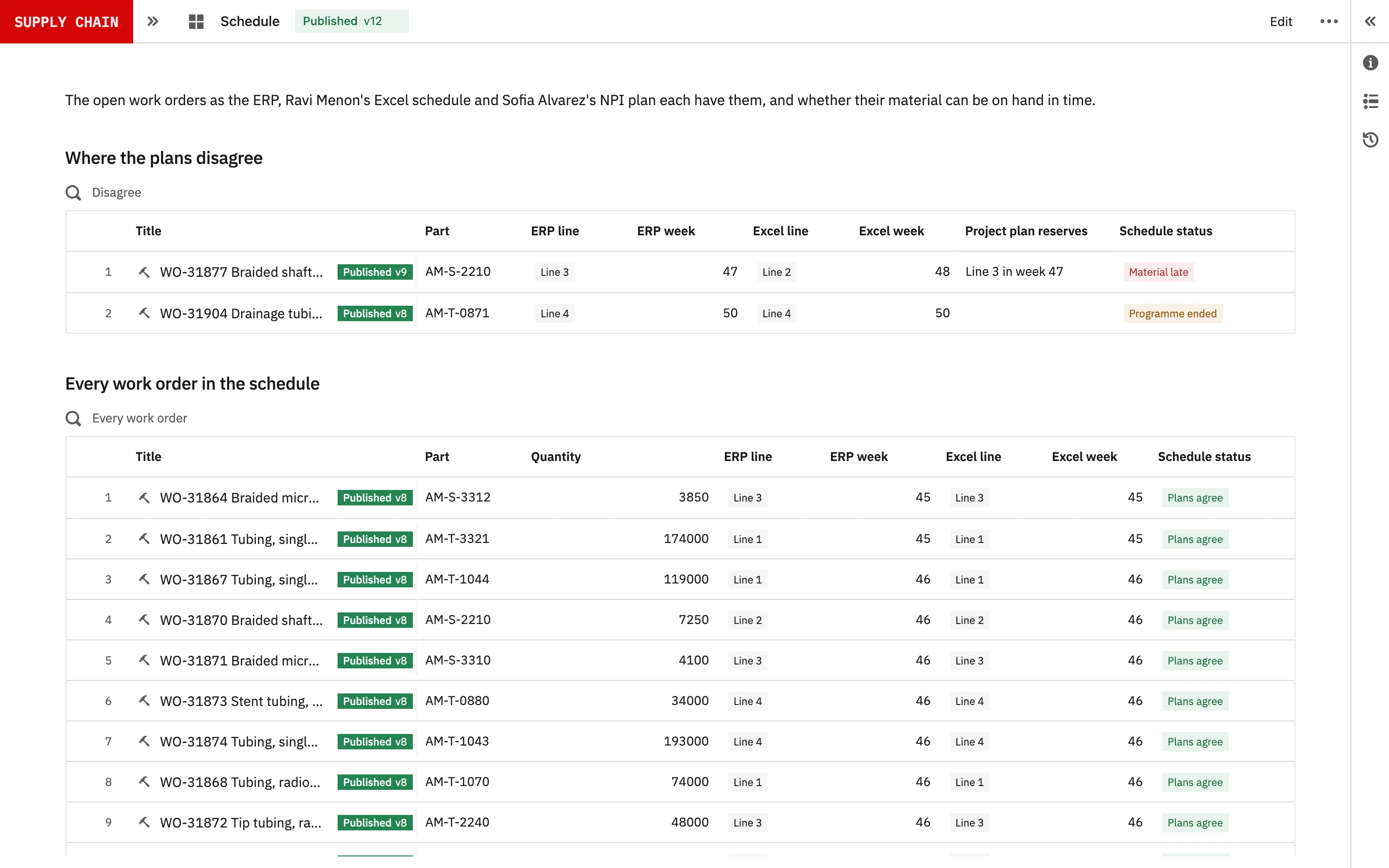
Acme Medical is a fictional ISO 13485 maker of tubing and catheter components, with four extrusion lines and a braiding line. Its ERP holds the work orders, its production planner sequences them in Excel, and its new-product planner keeps validation runs in MS Project. On Thursday 5 November 2026, Neil’s 06:00 run found five conflicts.
| Conflict | Where it shows | What Neil proposes |
|---|---|---|
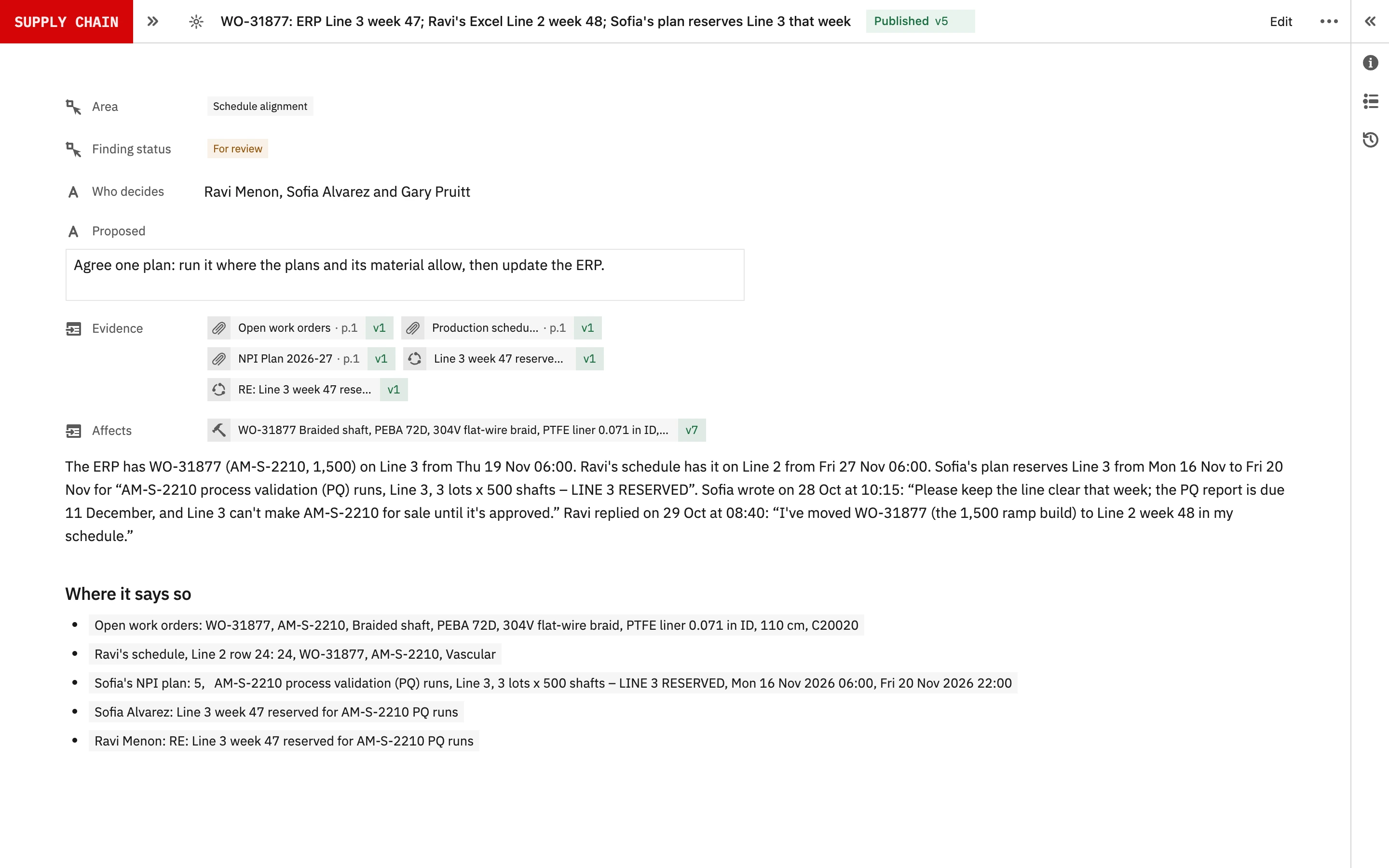
| WO-31877 is in two places, on a reserved line | ERP: Line 3, week 47. Excel: Line 2, week 48. MS Project: Line 3 reserved for validation in week 47 | Agree one line and week |
| WO-31877 can’t run as planned | It needs PEBA 72D from PO 4500-1182, now due 11 December | Move it after the material arrives, or get part of the order earlier |
| A run for a programme that ended | Week 50 in the Excel, for Acme Urology’s AM-T-0871 | Hold it until the customer confirms its open order |
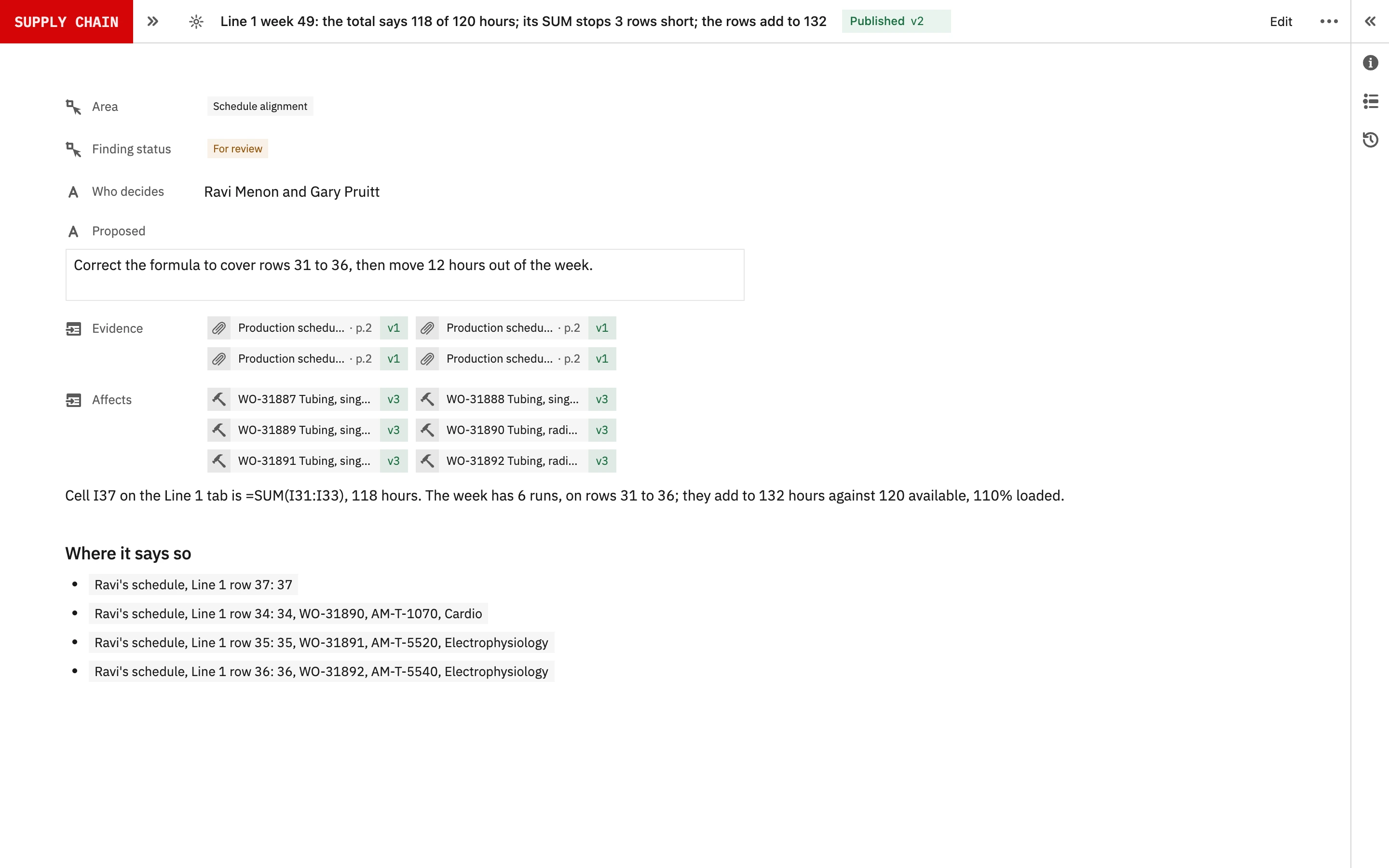
| Line 1, week 49 is over its hours | The Excel says 118 of 120 hours; its SUM stops three rows short, and the rows add to 132 | Correct the SUM, then move 12 hours out of the week |
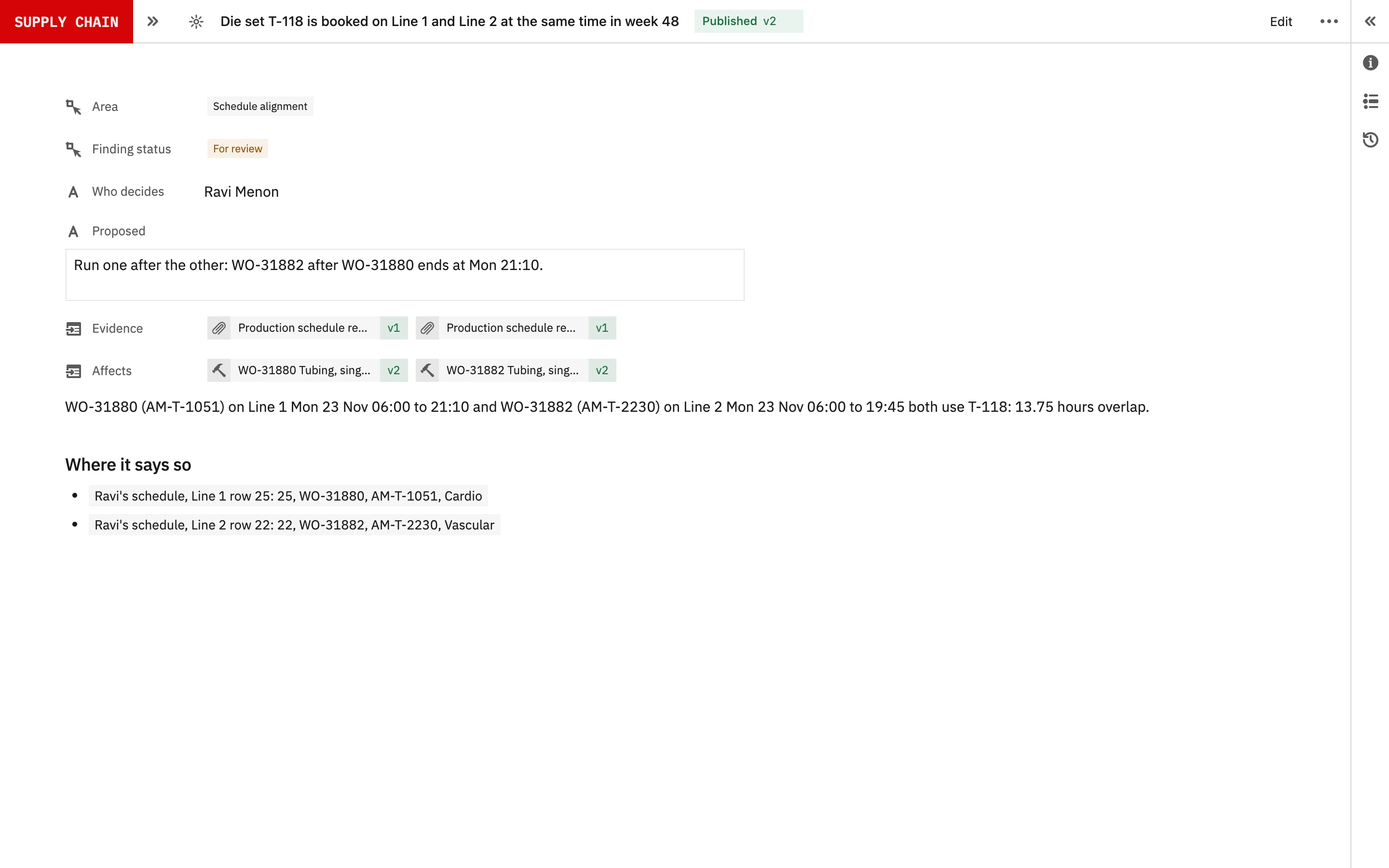
| Tool set T-118 is in two places | Booked on Line 1 and Line 2 at the same time in week 48 | Run WO-31882 after WO-31880 ends at 21:10 |
The first two are one problem seen twice. Acme Vascular’s ramp needs WO-31877, the validation runs need Line 3 the same week, and the material for the run has moved to December in an email nobody answered.
6People decide, and update their own plans.
Neil proposes a reconciled schedule, with each conflict, the evidence on each side and what each resolution moves. The production planner, the new-product planner and the production manager decide. Then the owner of each plan updates it: the ERP, the spreadsheet and the project plan. Neil never edits any of them. Each conflict is kept with its evidence, the decision and who made it.
7Validate it on past weeks.
Take a quarter that has ended, with the ERP’s work orders, the planner’s spreadsheet and the project plan as they stood each Monday. Neil checks each week as if it were live. Compare what it found with what happened: the double bookings found on the floor, the runs moved at short notice, the overtime and the runs that waited for material.
Count what Neil found in time, what it missed and what it raised that didn’t matter, and have the planners judge the proposals as they would a colleague’s.
8Start with one quarter.
Bring one quarter of work order exports, the planner’s spreadsheets as saved each week, and the project plans from the same weeks. Historical files are enough; no live access to the ERP is needed to prove it.
References
- 1de Man and Strandhagen, IFAC-PapersOnLine, 2018: from three cases of capacity planning and production scheduling, spreadsheet applications still dominate over ERP and APS as the main support for planners in their daily work. DOI
- 2Powell, Baker and Lawson, Errors in operational spreadsheets, Journal of Organizational and End User Computing, 2009: of 50 operational spreadsheets audited, 7 were free of errors that produce a wrong result, a spreadsheet error rate of 86%; errors were found in 0.9% to 1.8% of formula cells. DOI
- 3Larco, Fransoo and Wiers, Scheduling the scheduling task: a time management perspective on scheduling, Cognition, Technology & Work, 2017: seven schedulers observed over nineteen 8-hour shifts spent more time on their informational role than on their decisional role. DOI
- 4Tso et al., ConstraintBench, arXiv preprint, 2026: in the project planning domain, six frontier models solving without a solver produced a plan meeting every constraint 8.3% of the time on average. arXiv
- 5Xie et al., TravelPlanner, ICML 2024: GPT-4 achieved a success rate of 0.6% on realistic travel planning tasks with many constraints. arXiv
AConnected across Seal
BCapabilities
| Capability | What it covers |
|---|---|
| Every plan, as it is | Read ERP work orders, the planner’s spreadsheets and MS Project plans in their own formats. |
| Run matching | Match every run to one work order, line and week, by order number where there is one and by part, quantity and week where not. |
| Line and tool clashes | Find a line or a tool set booked for two runs at the same time. |
| Material at start | Check each run’s material arrives before the run starts, from open orders and the supplier inbox. |
| Recomputed totals | Recompute every hand-built total from its rows, and show where a formula stops short. |
| Capacity checks | Hold each line’s booked hours against its capacity, week by week. |
| Proposed schedule | Propose a reconciled schedule with each conflict and its evidence, for the planners to decide. Neil edits no plan. |
CConnected records
DQuestions and answers
Does Neil replace scheduling in our ERP or planning software?
No. Each plan stays where it is made. Neil reads them, checks that they agree with one another and with the factory, and proposes how to resolve what doesn’t.
Can Neil read our planner’s Excel and our MS Project plans?
Yes, as they are, with their tabs, colours, notes and hand-built totals. Every total is recomputed from its rows.
What data does a proof need?
One quarter of work order exports, the planner’s spreadsheets as saved each week, and the project plans from the same weeks. No live access to the ERP is needed.
Does Neil change the schedule?
No. Neil proposes. The planners decide, and the owner of each plan updates it. Neil never edits the ERP, the spreadsheet or the project plan.
Does Neil make the schedule itself?
No. Your planners make the plans. Neil checks them in code against lines, tools, material and capacity, and proposes a resolution for each conflict.
How does Neil know when material will arrive?
From the open orders and the supplier inbox, read the same morning. A supplier’s new date in an email counts before anyone has updated the ERP.
Is our data used to train AI models?
Under Seal’s agreements, your data is not used to train the underlying AI models.
What is kept?
Each conflict with the plans and cells it came from, the proposal, the decision and who made it.