Connect your systems.Put your knowledge to work.
Run lab, manufacturing and quality workflows in Seal, and connect the systems you want to keep. One shared ontology gives your team and Neil, your AI agent, the context to investigate, automate and improve the work.
Find your systems
Find the systems you use.
Search 178 systems and instruments by name, vendor or record. Each one’s page says how it connects and what the connection can read or write.
Quality and regulatory
Laboratory systems
ERP
Manufacturing systems
Maintenance and assets
Engineering and validation
Training and learning
Data historian
Analytics and reporting
Data science
Collaboration
Communication
Business systems
Patient services
File and API
Cloud infrastructure
Source control
Lab instruments
- Advanced Instruments OsmoTECH XT
- Agilent
- Agilent 2100 Bioanalyzer
- Agilent BioTek Gen5
- Agilent MassHunter
- Agilent OpenLab CDS
- Agilent Seahorse XF
- Agilent TapeStation
- ÄKTA UNICORN
- Anton Paar Litesizer
- Applied Biosystems QuantStudio
- BD FACSDiva
- Beckman Coulter CytoFLEX
- Beckman Coulter Vi-CELL BLU
- Berthold TriStar2
- Bio-Rad CFX Maestro
- Bio-Rad NGC ChromLab
- Bio-Rad QX200
- BMG LABTECH CLARIOstar
- Bruker OPUS
- ChemoMetec NucleoCounter NC-202
- Cytek Aurora
- Cytiva Biacore Insight
- Cytiva Sepax C-Pro
- Endress+Hauser Raman RunTime
- Eppendorf DASware
- Eppendorf epMotion
- Gyrolab
- Halo Labs Aura
- Hamilton Microlab STAR VENUS
- HORIBA LabRAM LabSpec
- Invitrogen Qubit 4
- Luminex xPONENT
- Malvern MicroCal PEAQ-DSC
- Malvern MicroCal PEAQ-ITC
- Malvern Panalytical NanoSight
- Malvern Zetasizer
- METTLER TOLEDO
- METTLER TOLEDO LabX
- METTLER TOLEDO STARe
- Miltenyi MACSQuant
- Molecular Devices ImageXpress MetaXpress
- Molecular Devices SoftMax Pro
- MSD DISCOVERY WORKBENCH
- NanoTemper Monolith
- NanoTemper Prometheus Panta
- NanoTemper Tycho NT.6
- Nova BioProfile FLEX2
- PerkinElmer
- Promega GloMax
- ProteinSimple Jess
- ProteinSimple Maurice
- Renishaw inVia WiRE
- Repligen KrosFlo KR2i and KMPi
- Repligen SoloVPE
- Revvity Cellaca MX
- Revvity EnVision
- Revvity LabChip GXII Touch
- Revvity Operetta Harmony
- Roche Cedex Bio HT
- Roche Cedex HiRes
- Sartorius
- Sartorius Ambr 15
- Sartorius Ambr 250 High Throughput
- Sartorius Ambr 250 Modular
- Sartorius Biostat and BioPAT
- Sartorius Incucyte
- Sartorius iQue
- Sartorius Octet BLI
- SCIEX Analyst
- SCIEX BioPhase 8800
- SCIEX PA 800 Plus
- SOTAX q-doc
- TA Instruments TRIOS
- Tecan Fluent
- Tecan Spark
- Thermo Fisher Attune NxT
- Thermo Fisher Countess 3
- Thermo Fisher Scientific
- Thermo Scientific Chromeleon
- Thermo Scientific KingFisher
- Thermo Scientific NanoDrop One
- Thermo Scientific OMNIC
- Thermo Scientific Xcalibur
- Unchained Labs Aunty
- Unchained Labs Big Tuna
- Unchained Labs Hound
- Unchained Labs Lunatic
- Unchained Labs Stunner
- Unchained Labs Uncle
- Waters
- Waters Empower
- Waters MassLynx
- Waters Wyatt ASTRA
- Waters Wyatt DYNAMICS
- YSI 2900 and 2950
If your system is not listed, Seal’s REST API and Scripts can connect it, and we can review its interfaces with you.
Each connection is scoped before it goes live.
You decide what Seal may read, whether anything is written back and which system stays the source of truth.
| Connection | Scope | Writes back | Source of truth | For example |
|---|---|---|---|---|
| Organisation library | Captured versions of selected records | No | The source system | SharePoint, SAP |
| Instrument export | Exported results, mapped by a Script | No | Instrument software | Empower, Agilent |
| Historian gateway | Current values and history windows | No | The historian | AVEVA PI, DeltaV |
| Provider API | Selected records your edition exposes | If separately approved | Agreed when scoped | MasterControl, Maximo |
| Seal API and Scripts | Records in the direction you agree | If agreed | Agreed when scoped | Snowflake, Power BI |
| Seal application | Pull requests, as change records | Status and approval | Seal, for approval | GitHub |
| Neil action | Actions your account exposes | Each call is approved | The source system | Veeva Vault |
Write-back is a separate decision, with its own mapping, review gates and audit evidence. A successful API response does not itself establish an approval; the review stays in the system you agree.
A record that originates outside Seal keeps its source identity, original units and version. An organisation library opens the original with the reader’s own permissions in that system, and a copy supports the work in Seal without replacing the source system’s complete history.
Neil works through the same connections, within the permissions of the person asking. A question about a batch can draw on its ERP, LIMS and MES records, with each fact traced to its source. In Slack and Microsoft Teams, each person connects their own identity, so Neil follows their Seal permissions there too.
How each connection is qualified, from service-account access to data freshness and write-back, is set out under connected systems in the regulatory guide.
The question spans systems.
Bring the answer together.
You do not need to replace these systems. Start with one process, connect the systems you keep and move more work into Seal when you’re ready.
What is holding up batch review?
Neil
- Two batches. Two different follow-ups. Both remain open for review.
- Lab evidence
- S-018 · 92.1%
Transfer hold
Assess the hold exception
- Lab evidence
- S-021 · pending
Transfer hold
Obtain the QC result
| Question | Neil prepares | Your team decides |
|---|---|---|
| What is holding up batch review? | The evidence and the hold investigation | QA: open items and disposition |
| Which batches used lot RM-118? | Affected batches, results and open work | The actual exposure |
| What would a new transfer check affect? | The check, its impact and its tests | The version, before release |
Each answer is assembled from the records where they live. A material trace follows lot RM-118 into B-041 and B-044, with their lab evidence and open reviews; B-045 is planned with RM-119 and is outside it.
A change keeps the history intact. B-041 and B-044 executed on v04 and keep it, with their open reviews. B-045, still planned on v04, is the candidate for v05, which needs release and training before it runs.
Turn what you learn into how you work.
Neil turns connected evidence into a proposed process change. Your team tests and approves each new version.
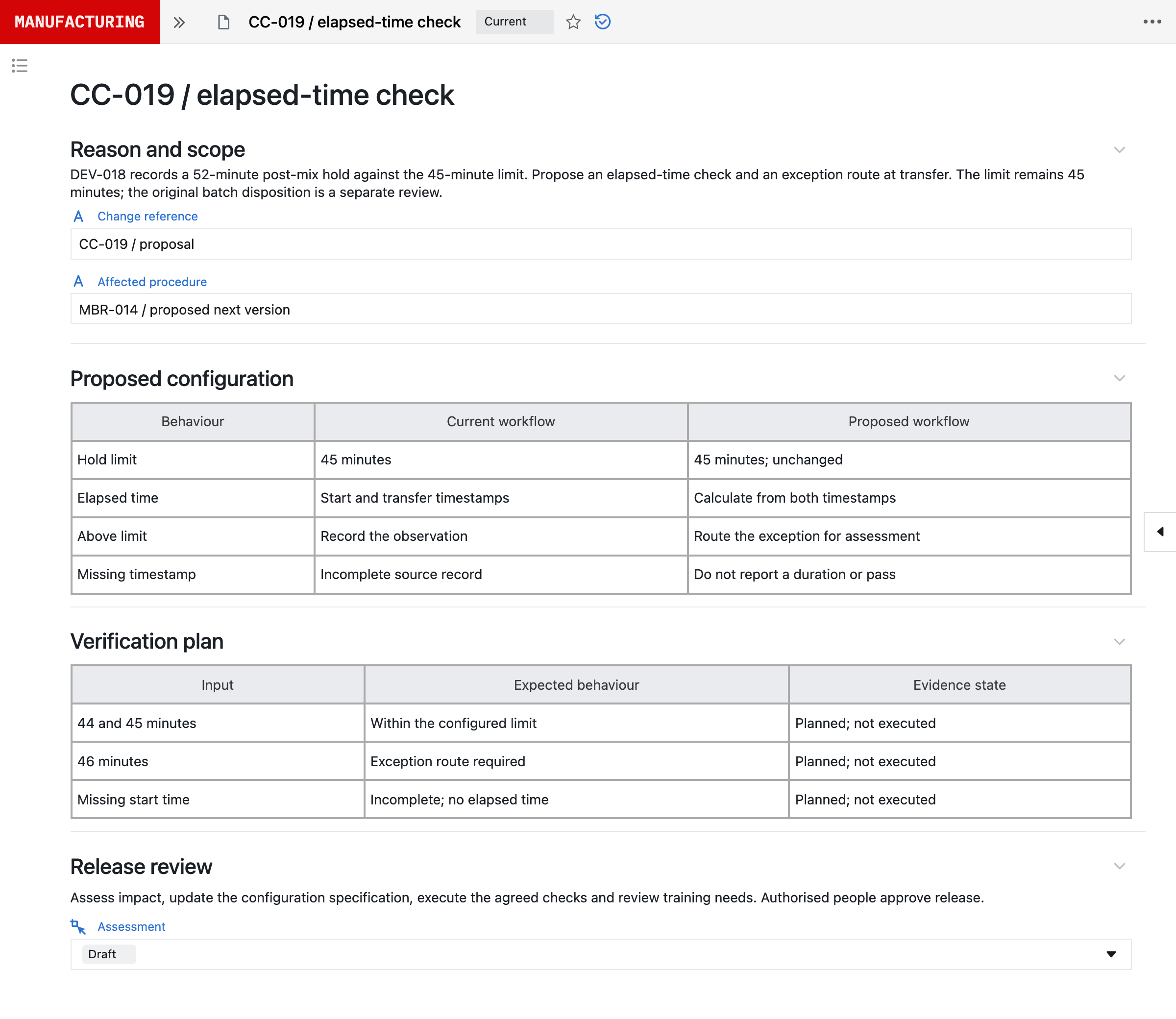
- Requirement
- Transfer within 45 minutes
- New behaviour
- Calculate the hold and route exceptions
- Verification
- 44, 45 and 46 minutes; missing timestamp
- Release
- Approval pending
CC-019 follows a 52-minute post-mix hold against the 45-minute limit. It proposes an elapsed-time check and an exception route at transfer, with verification at 44, 45 and 46 minutes and for a missing timestamp. The limit stays at 45 minutes, and the original batch disposition is a separate review.
In line with the EU’s draft GMP Annex 22 on AI, Neil is not used in GMP execution. It helps set up configuration, which your team verifies and releases under change control. See how Neil fits Annex 22 and a process evolve with AI.

From lab to commercial production on one platform.
75% less documentation time at MiAlgae
Read MiAlgae’s storyConnection guides.
Each guide works through one connection: the source evidence to collect, how it maps to Seal records and the acceptance checks to run before your team relies on it. See all connection guides.