Summary
- The problem
- Writing a revised SOP is the easy part. Someone must also change the form, train the right people, verify the behaviour and make sure the next run uses the right version, and when those live in separate systems every improvement becomes a coordination project.
- Seal’s approach
- The instruction is linked to the training, forms and execution rules it governs. A revision carries its reason, impact assessment, configuration and verification through change control, and completed records keep the version they used.
- Neil
- Seal’s AI agent drafts the revision from the source procedure, finds the forms, training and records it affects, and prepares the configuration change with its verification. Your team reviews and approves. About Neil.
- Evidence
- Bioventix: 80% less document admin time. Acclinate: 50% shorter quality cycle times and 40% less time preparing for audits.
- Where to start
- One procedure in a 48-hour evaluation: an effective SOP, a proposed revision and the form or training requirement it affects. Book a demo.
1A document system controls the file. Seal makes the procedure govern the work.
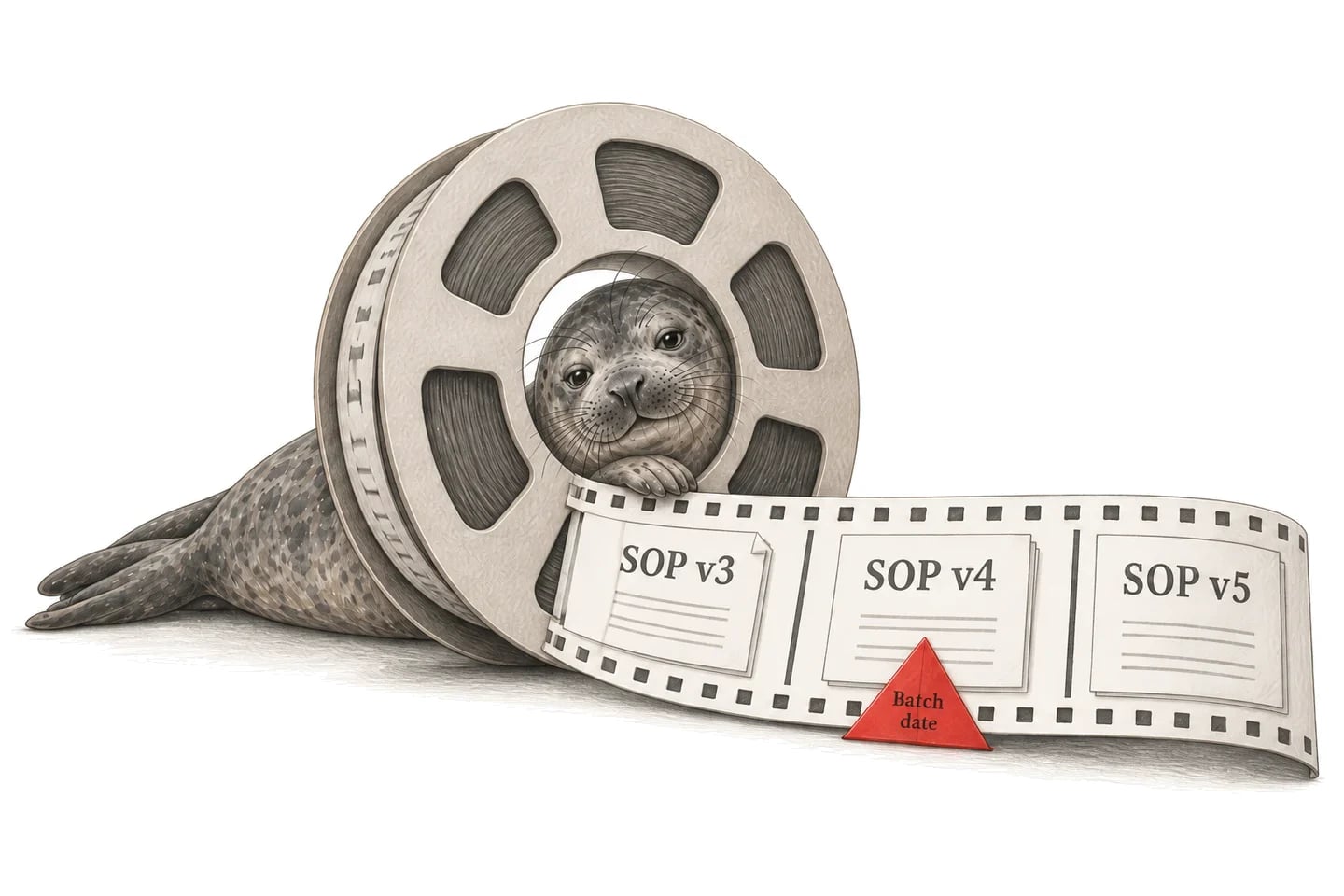
A traditional document management system is a system of record for files. It controls a procedure’s approval, effective date and read-and-understood training, and it sits beside the work the procedure governs. It can show who approved a revision. It cannot put the new check in front of the next operator.
| A traditional DMS | Seal | |
|---|---|---|
| What it controls | The file and its approval | The procedure and the work it governs |
| A new step | A revised PDF | A check in the workflow |
| Forms | Updated by hand elsewhere | Linked to the procedure version |
| Training | Read and understood | Assessed by role and activity |
| Effective use | A date on the document | After training, verification and copies |
| Completed records | Filed separately | Keep the version they used |
| AI | Text to paste elsewhere | Neil drafts the configured change |
| Getting started | A migration of the library | One procedure, beside your current system |
So a revision is approved and the work is not finished. Someone must still change the form, train the right people, verify the behaviour and make sure the next run uses the right version. When those live in separate systems, every improvement becomes a coordination project.
Seal links the instruction to the forms, qualifications and execution rules it governs. Documents, training, manufacturing, laboratory and quality share one platform, so a revision carries its reason, impact assessment, configuration and verification through change control to a controlled release. Once it is effective, the next run follows the new version, and the records already created keep the one they used.
You can start with one procedure, alongside the document system you already have. The advantage grows as forms, training and execution move onto the same foundation: fewer lists to reconcile after each revision, and a clearer path from an approved change to the work that follows it.
2Neil prepares the revision. Your team decides.
Neil is Seal’s AI agent. It works across the same records your team does, within the permissions of the person asking, and prepares a revision as work in the system: the revised instruction, the records it affects and the configuration change that implements it.
What else has to change if SOP-PKG-014 adds a second-person clearance check?
Neil
- Step 3 of SOP-PKG-014, redrafted with the check.
- FRM-PKG-014, which has no verifier or time fields.
- TRN-014, the supervisor qualification it needs.
- COPY-000044, the printed copy at packaging line 2.
- Affected records (met)Found, with sources
- Scope (not met)For the change owner
- Approval (not met)For the approvers
| Neil prepares | Your team decides | |
|---|---|---|
| Drafting | The revised instruction | Whether it is right |
| Impact | The records it affects | The scope of the change |
| Configuration | Fields and checks for the step | Approval and release |
| Verification | Specifications and test cases | Whether it supports release |
Everything in the middle column is preparation. Reviewers check Neil’s proposals against the source and confirm the scope. Neil does not sign for an approver or make a procedure effective by itself; required people and signatures still control approval.
In line with the EU’s draft GMP Annex 22 on AI, Neil is not used in GMP execution. It helps set up configuration, which your team verifies and releases under change control. Customer data is not used to train AI models, and the requester’s permissions govern what Neil can read. See how Neil fits Annex 22, how AI works with your data and more about Neil.
3Assess what a revision touches before approving it.
A wording correction and a new process step do not need the same implementation plan. Record the reason for the change, then assess the roles, forms, references and work it affects.
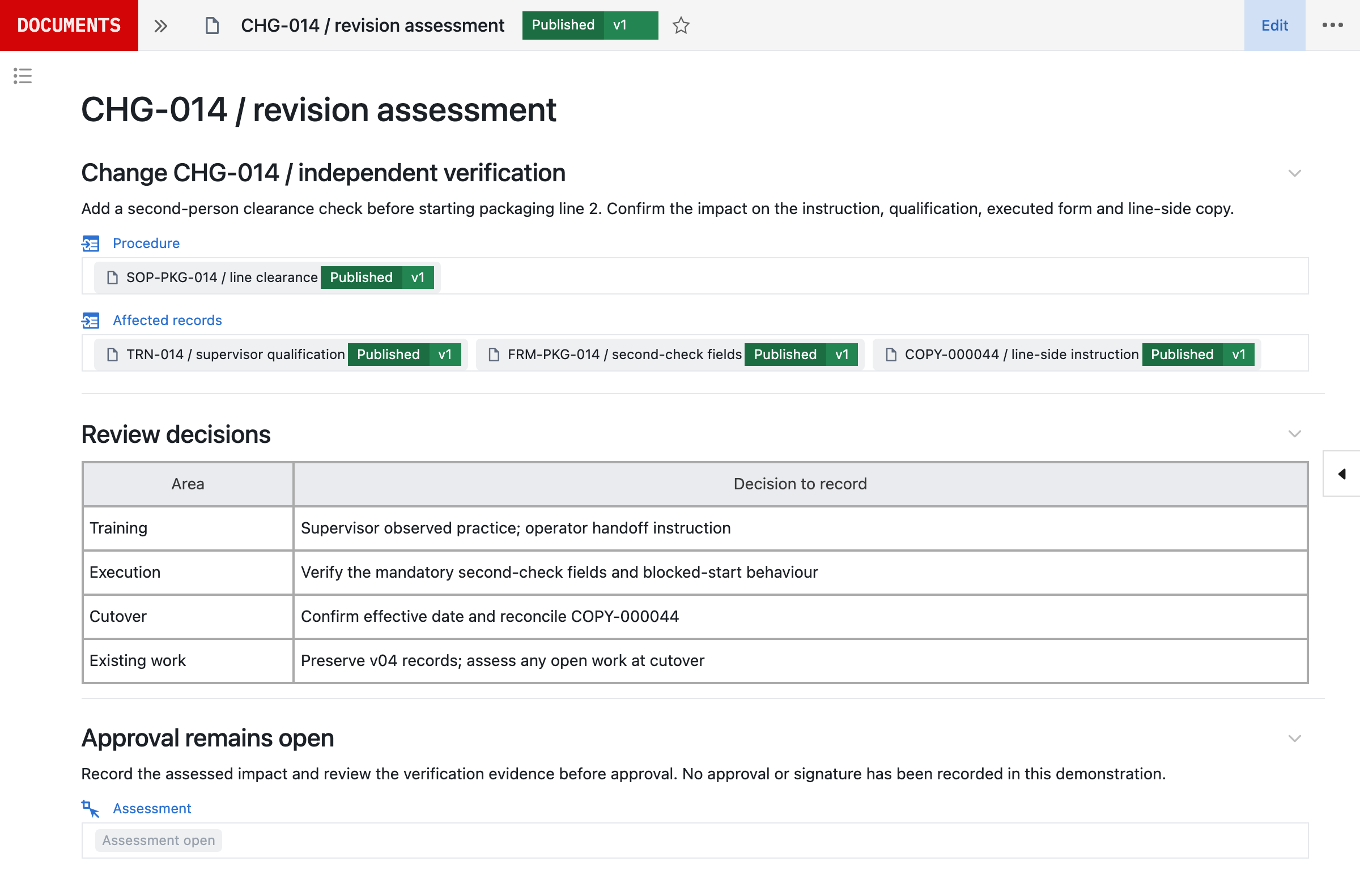
In this example, adding an independent line-clearance check to SOP-PKG-014 affects the operator’s instruction, a supervisor’s qualification, the form used to record the result and the printed copy at packaging line 2. Those are linked changes to one operation, not separate documents to reconcile later.
The assessment records a decision for each area: the training for each role, the execution behaviour to verify, the effective date and copy reconciliation, and how work already started on v04 is handled. Approval stays open until that evidence has been reviewed.
4Turn an instruction into an execution rule.
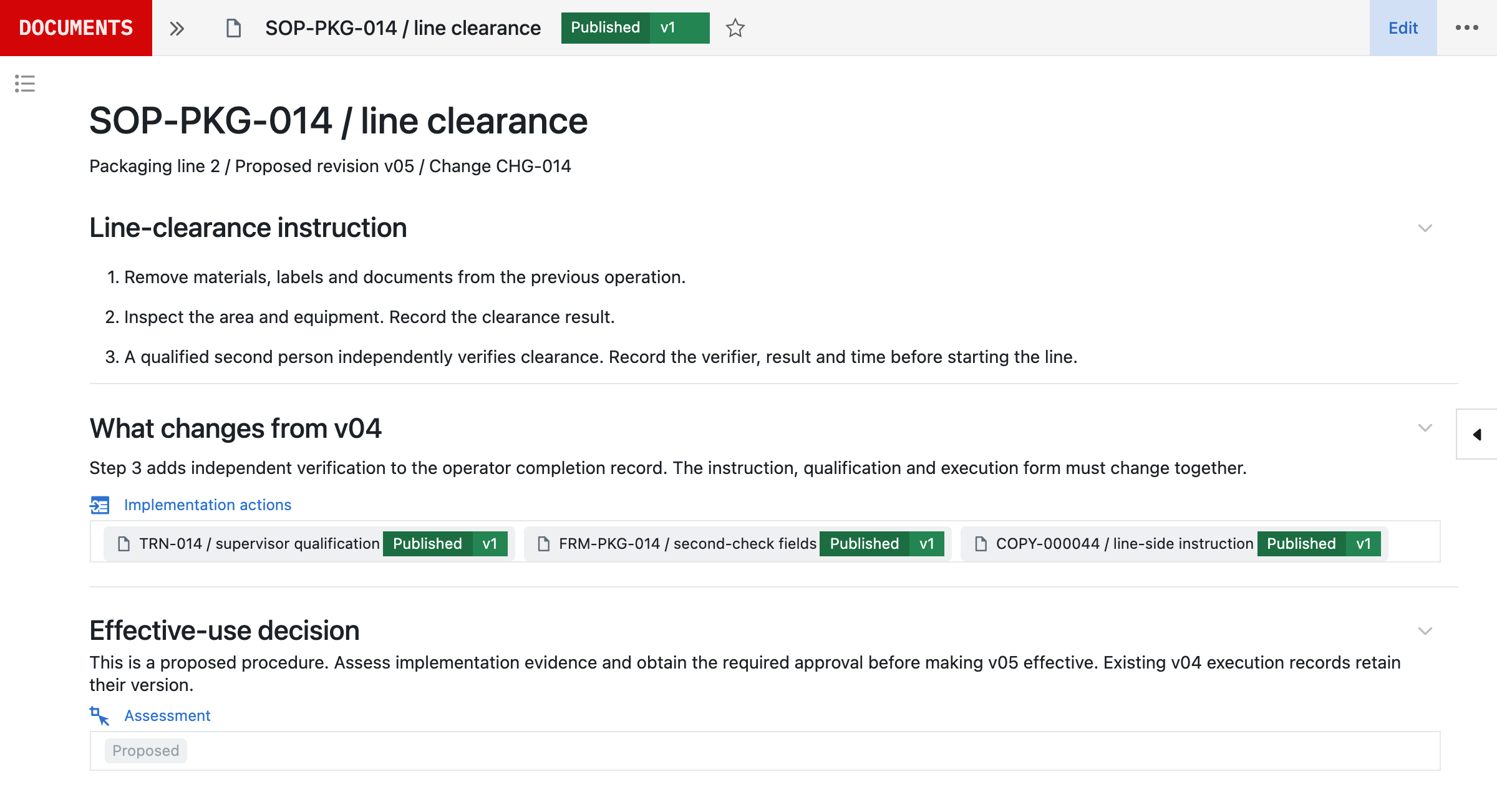
“Get a second person to check” becomes something specific: who can perform the check, which result is acceptable and what evidence must be recorded.
Step 3
A qualified second person independently verifies clearance. Record the verifier, result and time before starting the line.
- Who
- Qualified second person
- Result
- Clearance passed
- Record
- Verifier, result and time
- Otherwise
- Line start blocked
The proposed configuration makes those conditions explicit. A missing verifier, a failed check or a missing qualification keeps the line start blocked. Meeting this check allows the process to continue to its remaining requirements; it does not release the batch.
An SOP explains what to do. A linked form or workflow captures what happened: required fields, measurements and units, calculations, observations, attachments and signatures where needed. Define the form once as a controlled template, and the same kind of rule can govern manufacturing execution or laboratory workflows.
5Approval and effectiveness are different decisions.
Approval records agreement to a version. Effectiveness determines when it can be used, and the outgoing version stays effective until the replacement is ready.
- Use
- Packaging line 2
- Records
- Each keeps v04
- Earlier
- v03, kept for review
- Approval (met)Recorded
- Training (not met)Supervisors to qualify
- Copy (not met)Line 2 to replace
No v05 execution
Plan the cutover around the applicable training, verification, implementation tasks and outstanding copies, not only a date on a PDF. Keep a clear distinction between an approved version awaiting implementation and the instruction currently in use. Historical versions remain available to authorised reviewers without being presented as current instructions.
Each execution retains its version, values and history. Revising the template prepares future work; it does not silently rewrite a completed record.¹ An investigation can therefore follow the recorded result back to the exact instruction and configuration used.
6Train for the change, not only the document.
The impact assessment determines who needs training and what they need to demonstrate. Opening a document is not proof of competence.
- Change
- Performs the second check
- Training
- Observed practice
- Before use
- Qualified on v05
- Change
- Requests the second check
- Training
- Instruction and assessment
- Before use
- Assessed on v05
A clarification may need acknowledgement; a changed operation may need instruction, an assessment or observed practice. Connect assignments to the relevant procedure version, role and activity, and configure qualification checks where the work runs, so a completed training record supports the task it was intended for.
A proposed revision should not automatically invalidate every person’s existing qualification before the cutover has been assessed. Assignments, assessments and qualification evidence are covered in training and qualification.
7Continuous validation makes improvement part of the operation.
A validated system should be able to improve. When a procedure revision changes an executable workflow, its requirements, configuration, test evidence and approval belong to the same controlled change.²
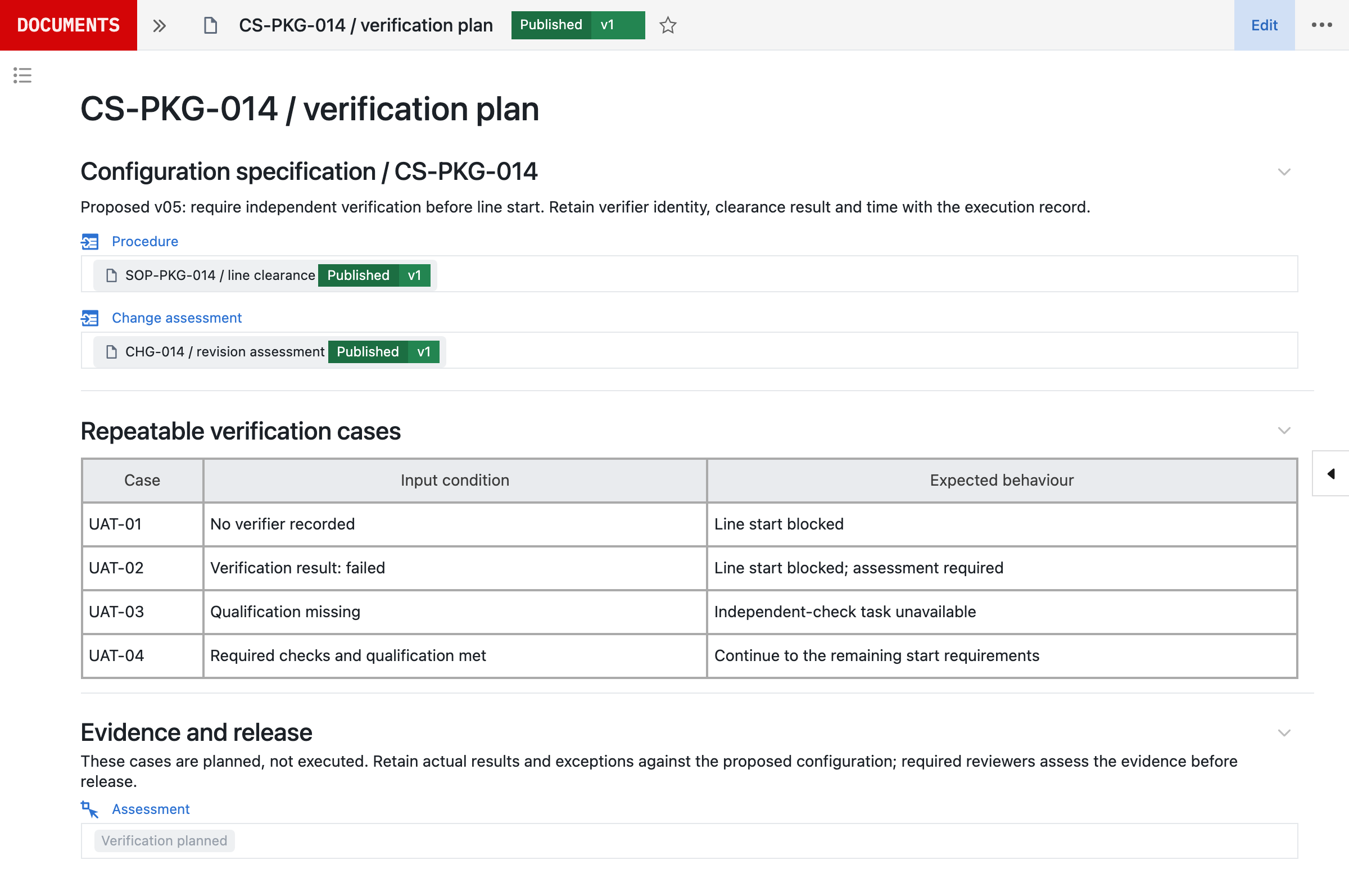
Keep the user requirements specification (URS), functional specification (FS), design specification (DS) and configuration specification (CS) linked to the implementation in Seal.³ Run automated verification and repeatable UAT checks for the changed behaviour, retain results and exceptions against the proposed version, and review the evidence before release. Neil prepares the specifications and verification cases with the change, so the evidence is drafted with it rather than after it.
The assurance effort follows intended use and risk; an editorial correction does not need to be treated as a new manufacturing process. Requirements, implementation and verification stay connected as the process evolves, so going live starts that lifecycle rather than freezing it. The continuous validation detail explains the risk-based assurance approach and responsibilities.
8Keep the full document lifecycle in view.
The same records support the rest of document control. Review content and implementation impact together, with the required people and signature meanings defined by your process.⁴
| Activity | What Seal records |
|---|---|
| Authoring and review | Owner, scope, references, reason and reviewers |
| Templates | Procedures, policies, work instructions, specifications and protocols |
| References | Fixed to a version, or following the current one |
| External documents | Issuer, edition, owner and applicability |
| Controlled copies | Copy, version, holder and replacement at cutover |
| Periodic review | Interval by type and risk, the inputs and the decision |
| Access | Who can author, approve, use or retrieve |
| Archive | Superseded versions, approvals and links to work |
A new edition of an external standard is assessed before the local process changes. A digital status cannot retrieve a physical printout, so local confirmation remains part of copy control. A periodic review considers source changes, deviations, audit findings and feedback, and records whether to retain, revise or retire the instruction. Archived versions stay intelligible after the process changes, for the required retention period.
9Start with one procedure, beside the system you have.
Bring an effective SOP, a proposed revision and the form or training requirement it affects to a demo. We work through the current process, model the relationships and agree what needs to be demonstrated before use.
| Where it lives today | What Seal uses | Connections include |
|---|---|---|
| Document libraries | Captured versions | Veeva Vault QualityDocs, SharePoint |
| Shared drives | Captured versions | Google Drive, Box |
| An existing eQMS | Documents and quality events | Veeva Vault QMS, MasterControl, Qualio |
| Training | Courses and transcripts | Cornerstone, Docebo |
A captured version is referenced with @ in documents, comments and Neil, and stays linked to its original. You do not need to replace these systems to start. Each connection is scoped before it goes live: what Seal may read, whether anything is written back and which system stays the source of truth. See all integrations.
The 48-hour evaluation turns that one procedure into a working workflow with a validation pack to inspect, so you judge Seal on your own procedure rather than a demonstration. Production timing then depends on scope, interfaces, migration and your release requirements.
For migration, inventory the source population, map document types and owners, preserve available versions and approval evidence, and reconcile imported records. Do not invent missing history or treat a file upload as an approved baseline. Agree the migration scope and acceptance checks before expanding to the next document family.
References
- 1EudraLex Volume 4, Part I, Chapter 4, Documentation (2011), sections 4.8 to 4.10: records should be made at the time each action is taken, alterations should be signed and dated and permit reading of the original information, and secure controls must ensure record integrity throughout the retention period. European Commission
- 2EudraLex Volume 4, Annex 11, Computerised Systems (2011), sections 4 (validation) and 10 (change and configuration management). European Commission
- 3ISPE, GAMP 5: A Risk-Based Approach to Compliant GxP Computerized Systems, second edition (2022).
- 421 CFR 11.50, Signature manifestations: signed electronic records must show the printed name of the signer, the date and time of signing, and the meaning of the signature (such as review, approval, responsibility or authorship). eCFR
AConnected records
BQuestions and answers
How is this different from a document library?
The distinction is the connection to execution. Seal links the procedure to its training requirements, forms, quality changes and the laboratory or manufacturing records it governs. You can assess and implement the operational impact of a revision in the same platform, rather than reconcile separate lists of files, people and tasks.
Can we use document control without replacing every system?
Yes. Start with a document family and the relationships needed for its intended use. Agree which system owns each record and how existing systems exchange information. Add training, quality or execution workflows in Seal as the scope grows.
Does every revision require retraining?
No blanket rule should replace the impact assessment. The change type, affected roles and intended activity determine whether acknowledgement, instruction, assessment or practical qualification is appropriate. Keep the rationale and required evidence with the revision.
Can an approved document wait before becoming effective?
Approval and effectiveness are distinct. Define the implementation conditions and cutover date for the configured workflow, including applicable training, verification and copy reconciliation. The outgoing instruction remains effective until the replacement is ready for controlled use.
What happens to existing records when a procedure changes?
Previously created records retain the version and history used for that work. Decide how open work is handled during cutover as part of the impact assessment; do not silently reinterpret it under the new instruction. New work uses the version made effective for its scope.
Can reviewers still see obsolete versions?
Historical versions remain part of the evidence available to authorised users. Point-of-use access should make the effective instruction clear, while reviewers and investigators can trace the earlier content, approvals and executions.
How does Neil help with document control?
Neil can help draft structured instructions, compare changes, find the records that use an instruction and prepare an impact assessment from permitted sources. People verify the content and completeness of the assessment. Neil does not supply a required person’s signature or bypass release controls.
Are our procedures used to train AI models?
No. Customer data is not used to train AI models. Records in Seal provide working context for Neil; that is different from training the underlying model. Neil follows the requester’s access permissions.
How do paper copies fit into the process?
Define how copies are issued, identified, located and reconciled. Link each copy record to its document version and plan replacement during cutover. A system cannot physically recall a printout, so the responsible person’s confirmation remains important.
Can we control external standards and supplier documents?
Yes. Keep the external source’s issuer, identifier, edition, owner and applicability. Assess replacements against the local documents and processes that depend on them. Internal acceptance of an external edition is separate from authorship or approval by its issuer.
How do we validate changes to executable procedures?
Assess the affected intended use, requirements and configuration. Keep the specifications, automated verification, repeatable UAT evidence and required approvals with the proposed version. The checks should match risk and scope; changing prose and changing an execution gate are different cases.
How should we migrate from an existing system?
Start with an agreed inventory and mapping for document types, owners, versions, references and approval evidence. Trial the import, resolve exceptions and reconcile the population before approving the baseline. The schedule depends on source quality and scope; missing history must remain an explicit exception.