


Summary
- The problem
- Each customer sends its forecast differently: spreadsheets by week, PDF tables, portal exports, numbers in an email. Someone keys them in every month, and a changed unit or an extra zero goes straight into the plan.
- Seal’s approach
- Neil reads every forecast into the same shape, keeps each number linked to its cell, compares it in code with the last version and the firm orders, and drafts a question where a change doesn’t hold together.
- What changes
- The plan starts from numbers that have been checked, and planners spend their time on the changes that are real.
- Where to start
- A year of one customer’s forecast files, compared with what it actually ordered. Book a demo.
1A forecast arrives in someone else’s format.
For a component maker, customers’ forecasts are the earliest sign of what will be needed. They are not orders, they change every month, and every customer sends its own: a spreadsheet by week, a table in a PDF, an export from a portal, a few lines in an email. Someone reads each one and keys the numbers into the ERP or a planning sheet.
Copying values from one document into another is where errors start. In a meta-analysis of 93 studies, people abstracting values from records by hand got 6.57% of them wrong, against 0.29% for keying from a clean form,¹ and checking re-keyed data by eye left about 30 times as many errors as keying everything twice.² A forecast is the harder case: a different layout every time, with its unit in a header and its corrections in a later email.
The numbers also move more than the demand beneath them. Two in three of 4,689 US public companies ordered more variably than they sold.³ In a study of one buyer and its suppliers, suppliers served the buyer worse when its forecasts were unreliable, and the buyer sent inflated forecasts to suppliers that had served it badly.⁴ A change in a forecast is a question before it is a fact.
2Read each forecast as it comes.
Neil reads spreadsheets, PDF tables, portal exports and email bodies as they arrive, without asking a customer to change anything. Each becomes the same shape: customer, part, week, quantity, unit, firm or forecast, and the version it belongs to. Every number keeps a link to the file and cell, or the page and line, it came from.
Customers’ part numbers are matched to yours from the cross-reference in your ERP or planning sheet. A part Neil can’t match is asked about, never guessed. A corrected file sent later the same day replaces the first, and the change between them is shown.
3Read twice where it matters.
AI models read documents well, and not perfectly. In one study, a 2023 model reading 160 values from PDFs got 6 wrong, most of them by missing a value.⁵ In another, where two models read the same documents and agreed, they were right 94% of the time; where they disagreed, each was right at most half the time.⁶ So disagreement is the signal. A value Neil reads differently twice is held for a person.
Then code checks what reading can’t: that the lines add up to the file’s own totals, that the unit matches the header and the part’s history, and that every week is a real week on the calendar.
4Compare in code with what came before.
Each forecast is compared, in code, with its last version and with the customer’s firm orders, part by part and week by week. A quantity far above the firm order, a unit that changed, a forecast at zero beside an open order, and a jump larger than the planners’ threshold for that part are all raised.
A change is not an error. A real ramp is the most important thing a forecast can show, and the earlier the better. So Neil looks for what supports a change, such as a new firm order or a customer’s email about the programme, and shows it beside the number.
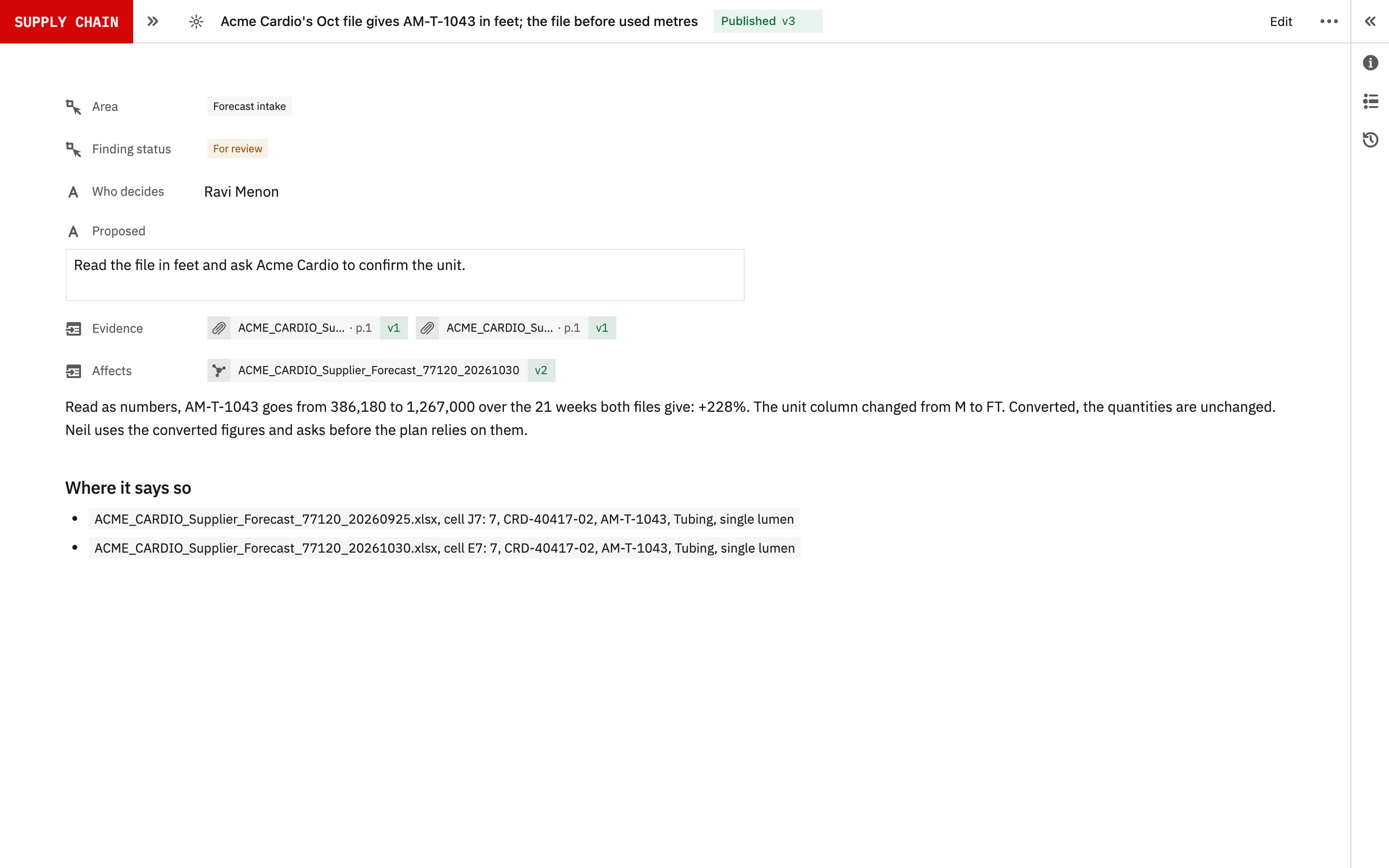
Acme Cardio, October
- Part
- AM-T-1043
- Unit in this file
- feet
- Unit in earlier files
- metres
- Change
- Unit, not demand
- In the plan
- Not yet
- Question
- Drafted for the planner
5Five of six files at Acme Medical.
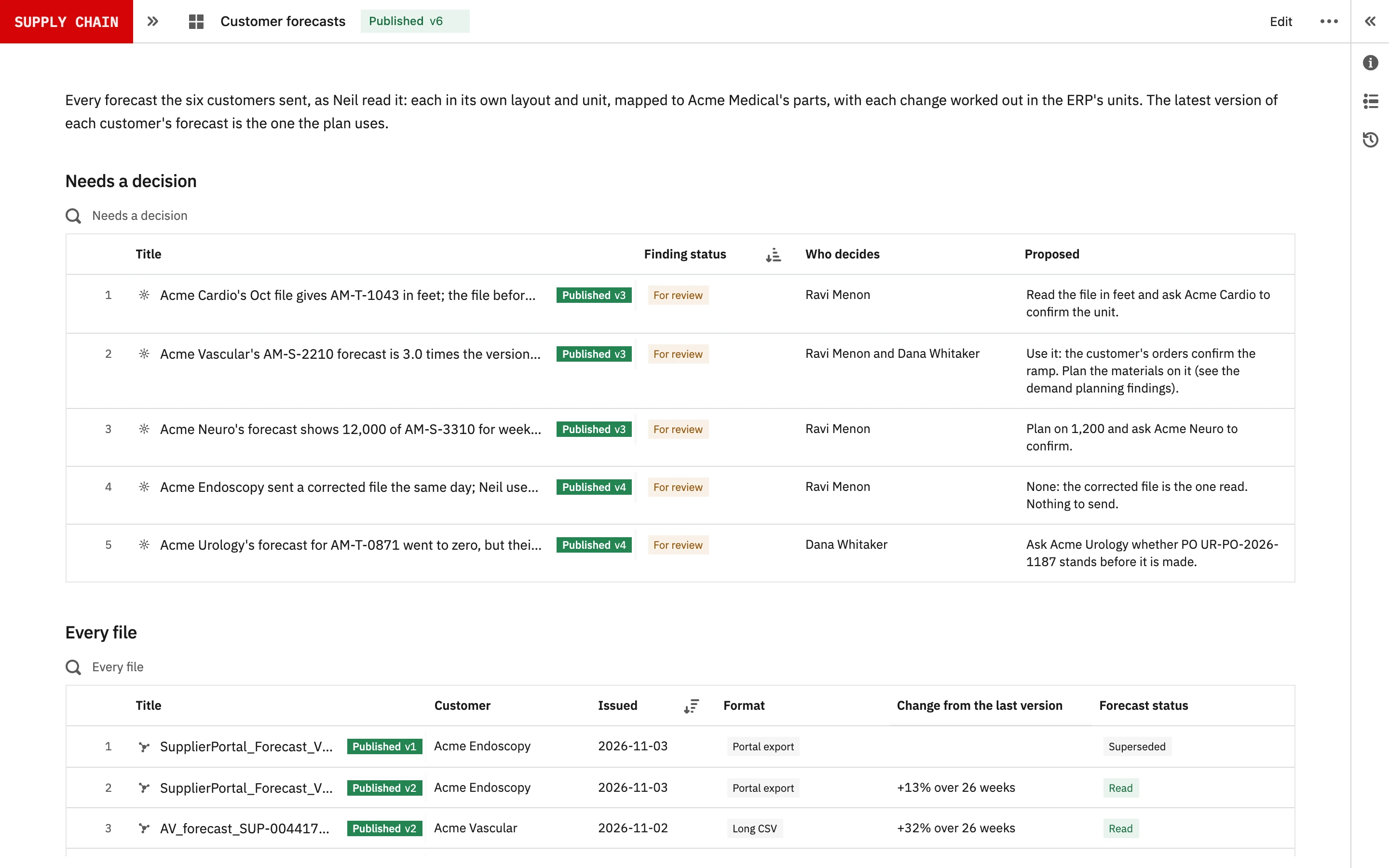
Acme Medical is a fictional ISO 13485 maker of tubing and catheter components, with six OEM customers who each send a monthly forecast. By 06:00 on Thursday 5 November 2026, Neil had read the latest from each.
| Customer | What the file said | What Neil did |
|---|---|---|
| Acme Cardio | AM-T-1043 in feet, where every earlier file used metres | Converted it, and asked before the plan relies on it |
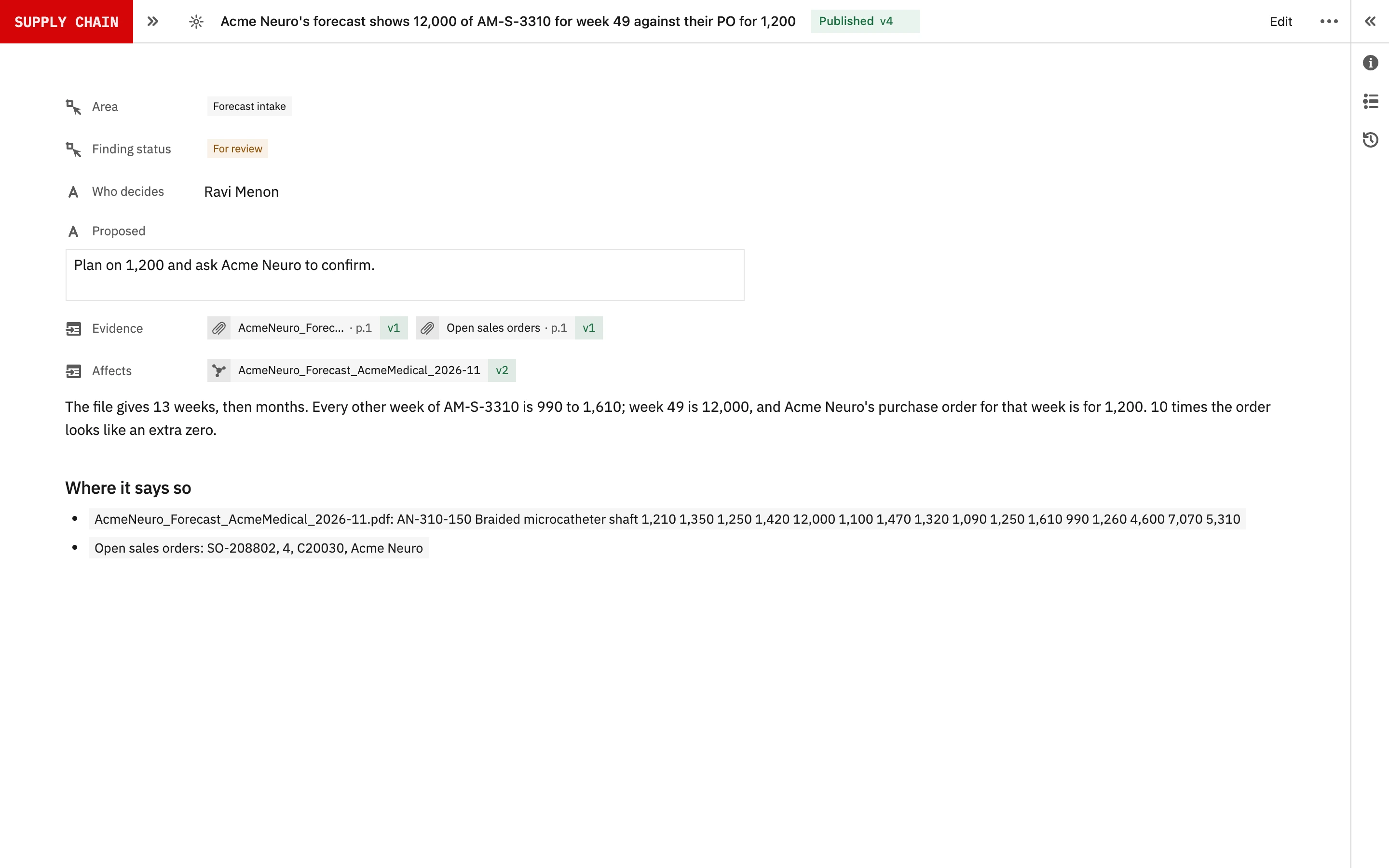
| Acme Neuro | 12,000 for week 49, against a firm order for 1,200 | Drafted the question: a likely extra zero |
| Acme Vascular | AM-S-2210 at three times the last version | Raised it as real, with the customer’s firm orders |
| Acme Urology | Zero in every month, with an open order for 5,000 of AM-T-0871 | Asked whether the order stands |
| Acme Endoscopy | A corrected file two hours after the first | Used the later file, and said so |
Acme Vascular’s ramp is the one that matters most. It feeds material demand planning, where it shows PEBA 72D running short, and production schedule alignment, where the work order it needs can’t run as planned.
6Your team asks, and decides.
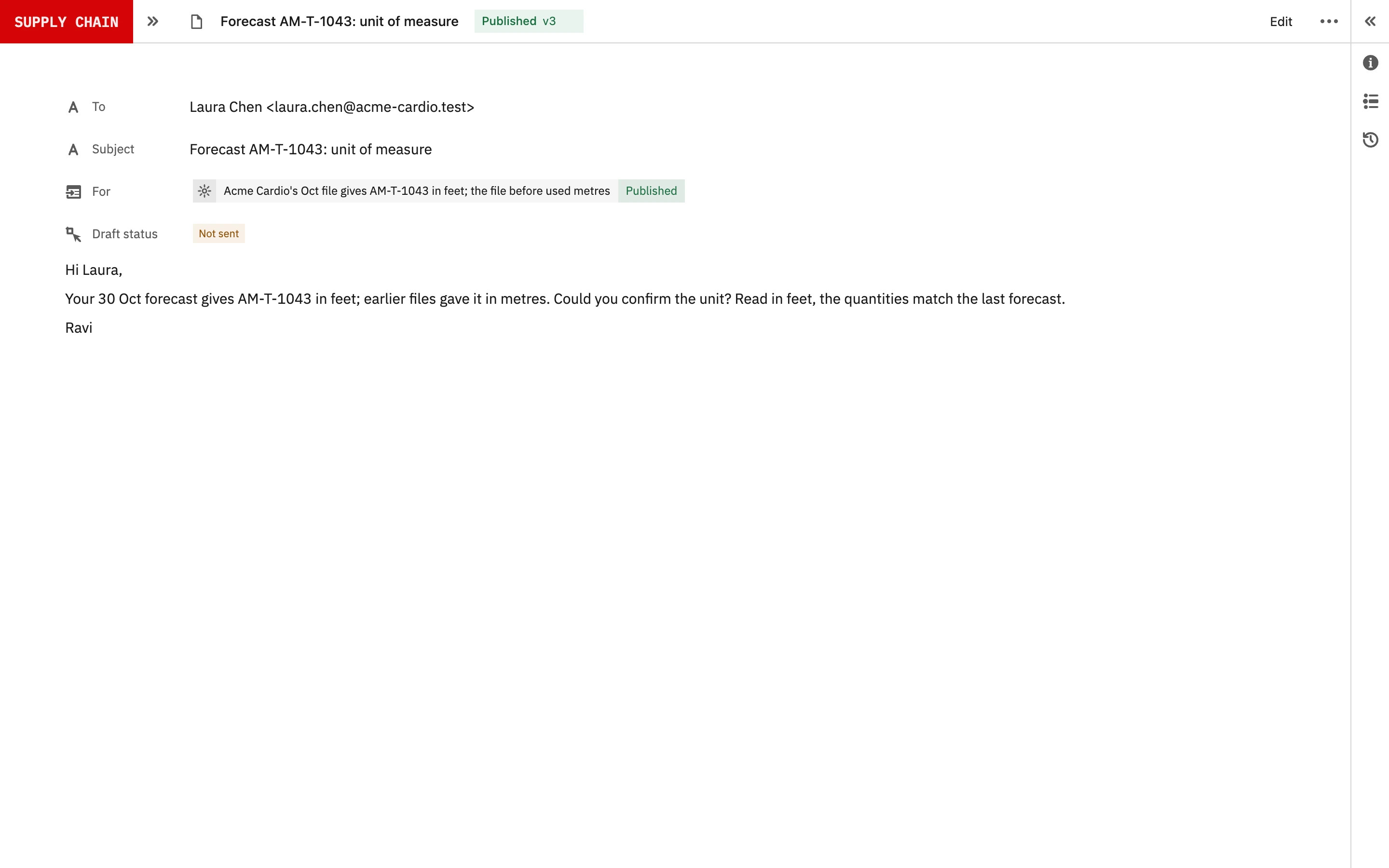
Neil drafts each question for the person who decides it, who edits it and sends it. Neil never emails a customer. A version enters the plan only when a planner accepts it, and the accepted version keeps its files, the questions asked, the answers and who accepted it. Reviewing what a customer requires before committing to supply it is part of your own ISO 13485 system (clause 7.2.2), and the record shows how each forecast was reviewed.
7Validate it on a year of forecasts.
Take a year of one customer’s files and the numbers your team keyed from them. Neil reads the same files, and you compare the two value by value, each difference shown beside the cell that settles it. Then hold each version against what the customer actually ordered, to see which changes were real and which Neil would have asked about.
From that comparison your planners set the thresholds per customer and part, and decide what a person checks. Repeat it when a customer changes its layout or the model changes.
8Start with one customer.
Bring one customer’s forecast files for a year, the orders it placed, and the planning sheet your team keyed the forecasts into. Historical files are enough; no live access to the ERP or the inbox is needed to prove it.
References
- 1Garza et al., Error rates of data processing methods in clinical research: a systematic review and meta-analysis, International Journal of Medical Informatics, 2025: across 93 studies, medical record abstraction had a pooled error rate of 6.57%, and single data entry 0.29%. DOI
- 2Barchard and Pace, Preventing human error: the impact of data entry methods on data accuracy and statistical results, Computers in Human Behavior, 2011: visual checking resulted in 2,958% more errors than double entry. DOI
- 3Bray and Mendelson, Information transmission and the bullwhip effect: an empirical investigation, Management Science, 2012: about two-thirds of 4,689 US public companies, 1974 to 2008, showed a bullwhip, ordering more variably than they sold. DOI
- 4Terwiesch, Ren, Ho and Cohen, An empirical analysis of forecast sharing in the semiconductor equipment supply chain, Management Science, 2005: suppliers penalize buyers for unreliable forecasts by providing lower service levels, and buyers penalize suppliers with a history of poor service by giving them overly inflated forecasts. DOI
- 5Gartlehner et al., Research Synthesis Methods, 2024: across 160 data elements from 10 trial publications, Claude 2 was 96.3% accurate and made 6 errors, most of them missed items. DOI
- 6Khan et al., Journal of the American Medical Informatics Association, 2025: responses on which GPT-4-turbo and Claude-3-Opus agreed were 0.94 accurate; where they disagreed, accuracy was 0.41 and 0.50. DOI
AConnected across Seal
BCapabilities
| Capability | What it covers |
|---|---|
| Any layout | Read forecasts from spreadsheets, PDF tables, portal exports and email bodies, as each customer sends them. |
| One shape | Turn every forecast into customer, part, week, quantity, unit and firm or forecast, with the file and cell each number came from. |
| Part matching | Match customers’ part numbers to yours from your cross-reference, and ask about any part that doesn’t match. |
| Second reads | Read uncertain values twice, and hold any disagreement for a person. |
| Version comparison | Compare each forecast in code with its last version and the customer’s firm orders, against thresholds the planners set. |
| Drafted questions | Draft the question to the customer for a planner to edit and send. Neil sends nothing. |
| Accepted versions | Keep each accepted version with its files, its questions and answers, and who accepted it. |
CConnected records
DQuestions and answers
Do our customers have to change how they send forecasts?
No. Neil reads them as they come: spreadsheets, PDF tables, portal exports and emails, each in its own layout.
Does Neil load the forecasts into our ERP?
No. Neil reads, checks and prepares each version. A planner accepts it, and the people who own the ERP load it the way they do now. Neil never edits the ERP.
What data does a proof need?
A year of one customer’s forecast files as they were received, the orders it actually placed, and the planning sheet your team keyed the forecasts into. No live access is needed.
What happens to a change Neil can’t explain?
It stays out of the plan, and Neil drafts a question for the planner to edit and send. Neil never emails a customer.
How does Neil match customers’ part numbers to ours?
From the cross-reference in your ERP or planning sheet. A part it can’t match is asked about, never guessed.
Can Neil read forecasts sent inside an email?
Yes: tables pasted into the body, attachments, and corrections sent later in the same thread. The later version is used and the change between them is shown.
Is our data used to train AI models?
Under Seal’s agreements, your data is not used to train the underlying AI models.
What is kept for an audit?
Every file as received, every number with its source, every question and answer, and each accepted version with who accepted it and when.