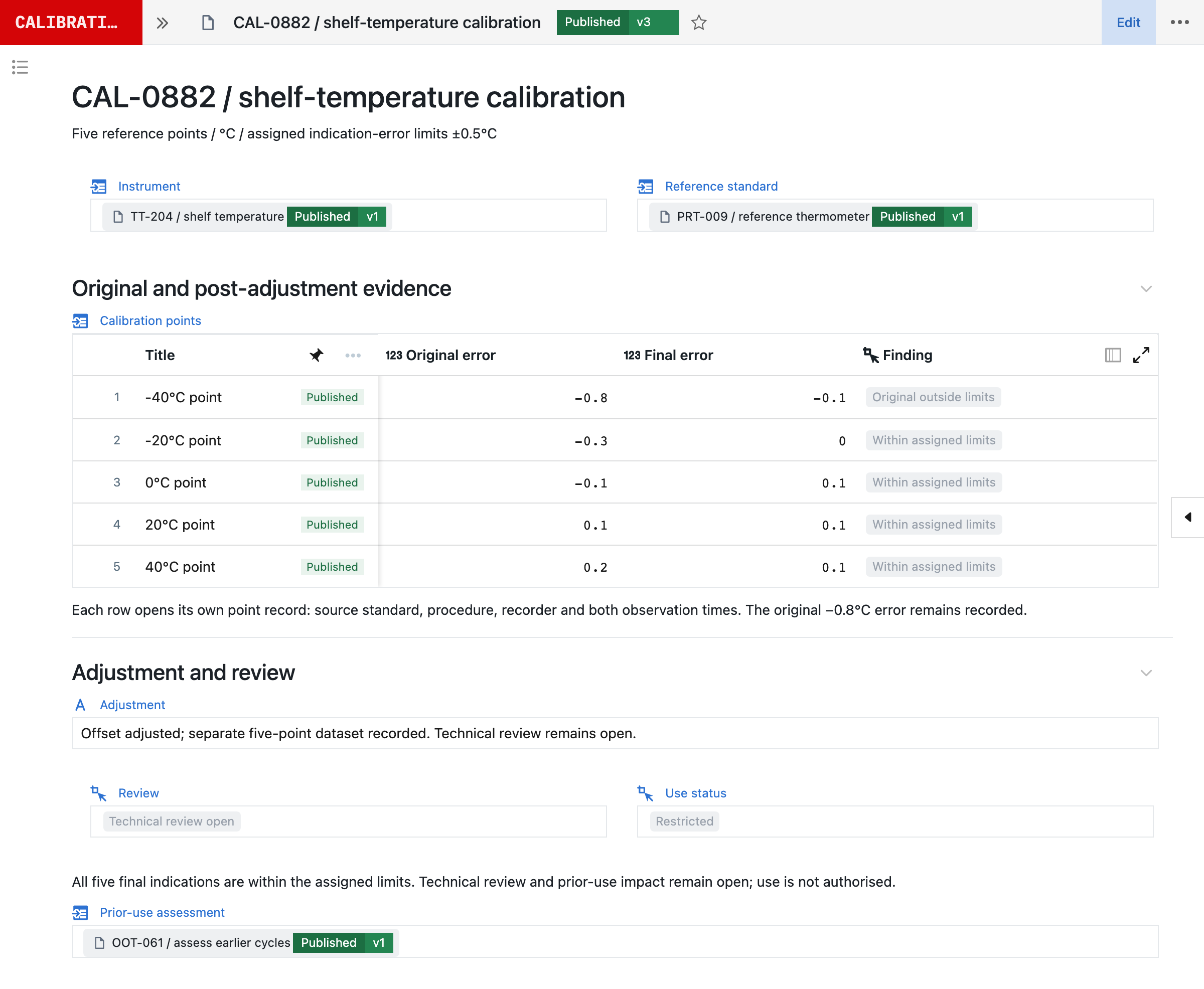
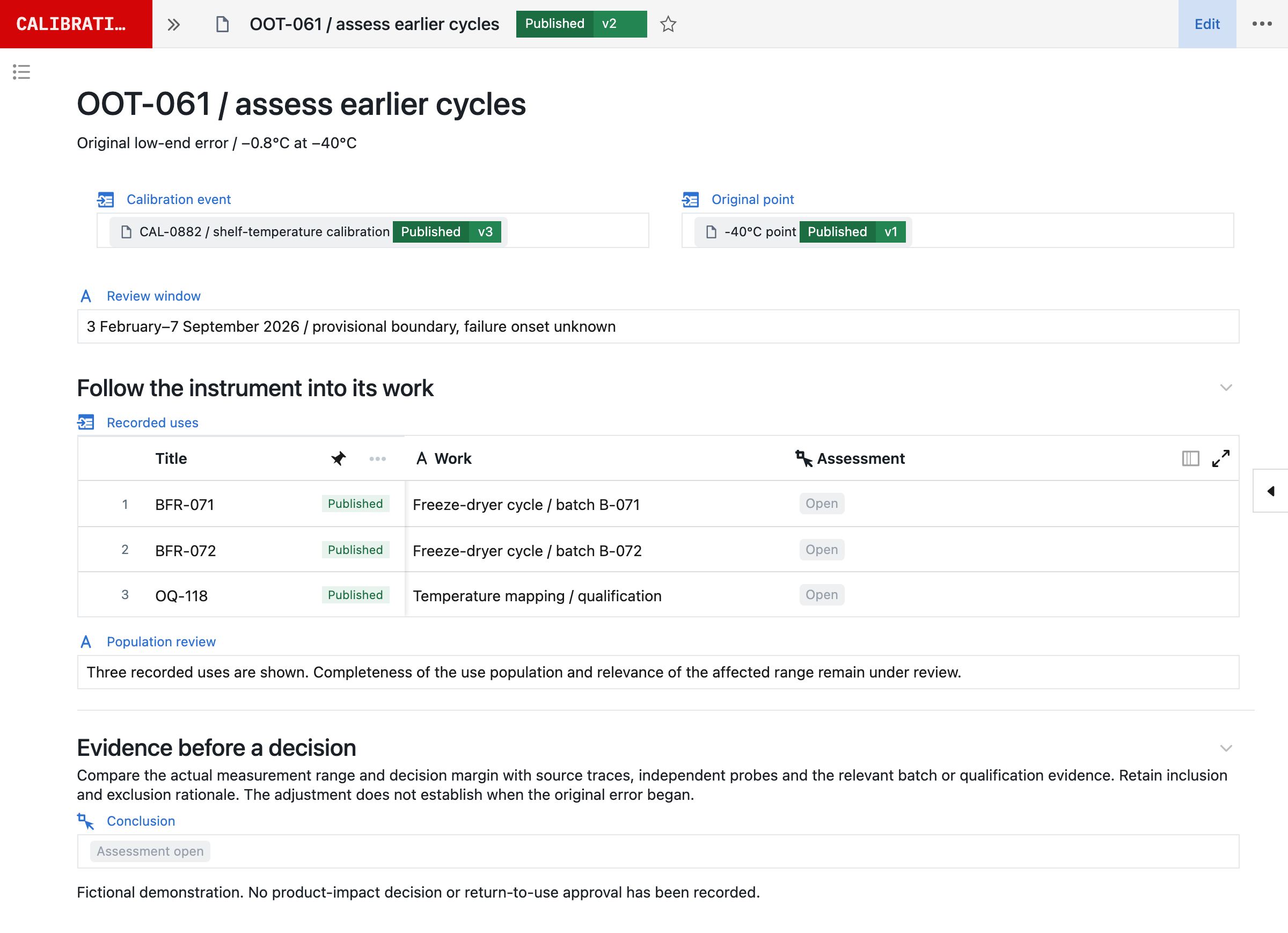
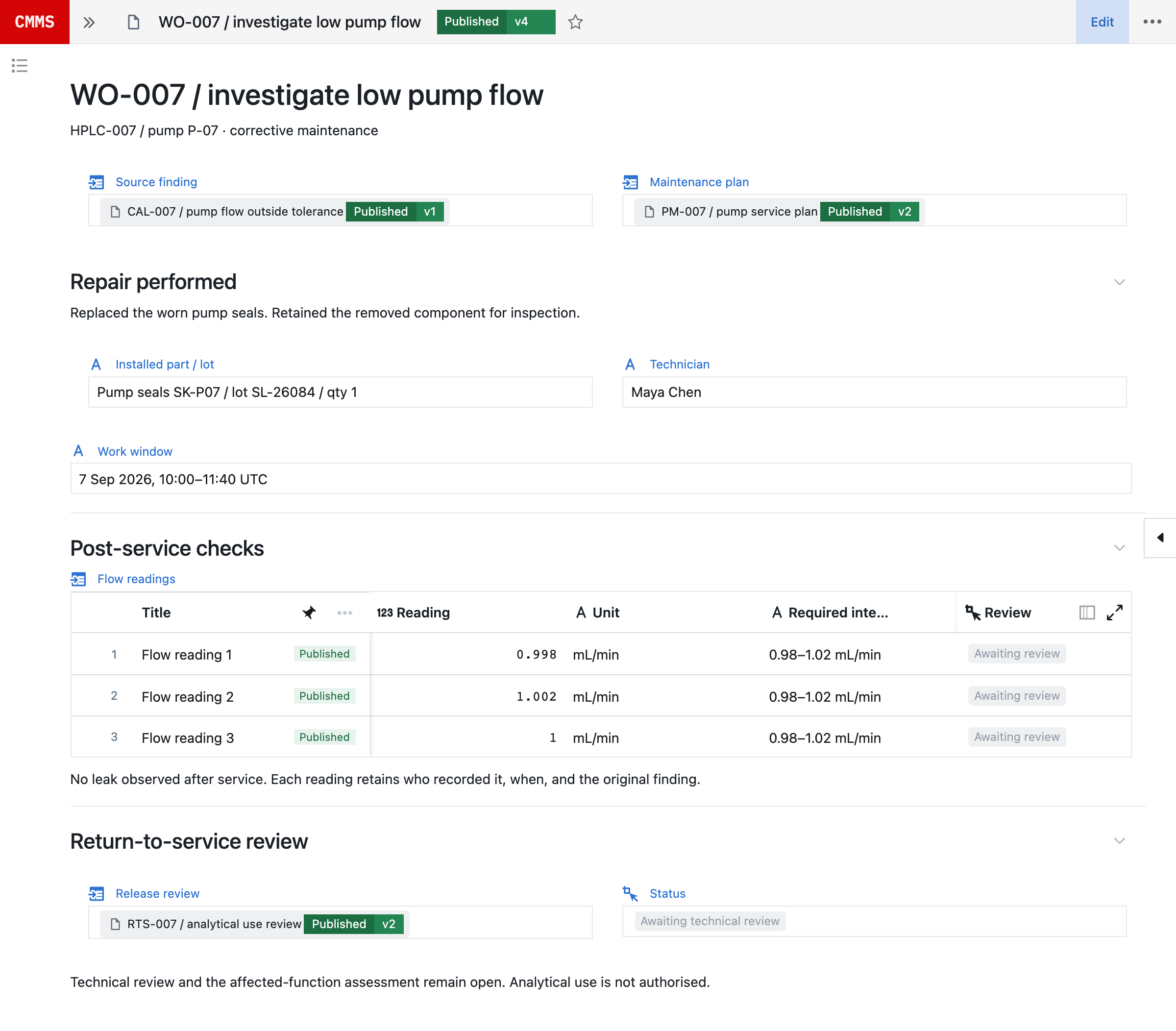
Summary
- The story
- IBM Maximo is good for asset management of critical equipment and infrastructure.¹ It began in the early 1980s, when nuclear and other plants that scheduled maintenance outages with PSDI’s mainframe project scheduler asked for a maintenance product: Maximo shipped in 1985 for work orders and inventory, and IBM bought the company in 2006.⁸⁹ Its model is still the asset and the work order, sold to manufacturing, utilities, oil and gas, transport and public infrastructure.¹ ABS Group, which sells a pre-configured Maximo package, calls implementing such a system involved and resource consuming, with a validation package on top for regulated markets, and in 2020 IBM’s own validation material was blank test-script templates under a separate life sciences licence.¹⁰¹¹ Maximo Assistant, released in 2025, answers questions about work orders and assets, and IBM says that since June 2026 it can plan and complete maintenance tasks.²³ If you run a large, stable estate of equipment, it can work well. Most GMP teams need each instrument’s calibration on the same records as the batches and tests it measured.
1What IBM Maximo offers.
Maximo is IBM’s enterprise asset management suite, built for operations, maintenance and facility teams in manufacturing, energy and utilities, oil and gas, transportation and government, and licensed through AppPoints.¹ In Maximo Manage, calibration is maintenance work and IBM lists it among the add-ons: job plans define the procedure, data sheets hold tolerances, and calibration work orders gather As Found and As Left data.⁵⁶ Version 9.1, released in June 2025, added Maximo Assistant, a chat built with watsonx.ai.² IBM says its AI also reviews work orders to detect missing information and recurring issues and recommends the next best action.⁵
2Running Seal alongside IBM Maximo.
Teams move GMP equipment to Seal one family at a time, with Maximo connected while they do. Seal’s IBM Maximo connection is set up per project on Maximo Manage’s REST/OSLC APIs: inspect your installation’s generated API specification and grant access to the selected object structures. IBM notes that because the APIs are configurable and extensible, their documentation varies for each installation.¹² In scope are assets, work orders and service requests in the authorised Maximo object structures. Start with read access; any change in Maximo needs separately configured actions and controls.
Once API access and mappings are configured, Neil can:
- compare work-order history with the batches and quality events supplied for review;
- summarise repeated failures and missing evidence in a proposed work package;
- collect available maintenance status and history, without treating it as a return-to-service approval.
During the move, Maximo stays the source of maintenance execution for the remaining assets while Seal connects its work-order identity and status to equipment use, laboratory records and quality review. Define which system owns asset identity, work orders, calibration results and current restrictions, which events cross the boundary, and how a failed handoff is detected.
3Moving from IBM Maximo to Seal.
Move one equipment family first, so nothing has to move on day one.
- Choose an equipment family whose uses matter, such as the HPLCs used for release testing or the temperature transmitters on a freeze dryer.
- Bring the equipment list, its current evidence, such as data sheets, job plans, certificates and recent work orders, and one method or process that uses it. Start with sample material, or arrange an NDA before sharing confidential records.
- Neil drafts proposed asset records, specifications and workflow requirements from manuals, certificates and inventories. Review identifiers, component relationships, dates, units and ranges against the originals; a manufacturer’s recommendation is input to the assessment, not your approved interval. Once the scope is agreed and the inputs received, Seal prepares the first working process and its validation pack to evaluate within 48 hours. Production timing then depends on scope, interfaces, migration and your release requirements.
- Connect Maximo read-only for the work orders and maintenance status the process needs.
- Test the exception paths as well as the normal flow: select an eligible asset, restrict it, trace its prior uses, assess a change and show the evidence required before it returns to service.
- When maintenance itself moves, reconcile assets, components, open orders, due dates, plans and historical evidence, and preserve identifiers, approved versions and any source gaps.
Retention obligations continue for the records that stay in Maximo. The CMMS blueprint describes maintenance work in Seal in detail.
References
- 1IBM Maximo Application Suite, IBM. https:/
/ www. ibm. com/ products/ maximo (read 5 November 2026) - 2Enhanced Maximo Streamlines Workforce Efficiency, Investment Planning, and Facilities Management; Introduces Gen AI Assistant, Kendra DeKeyrel, IBM Newsroom, 25 June 2025. https:/
/ newsroom. ibm. com/ blog- enhanced- maximo- streamlines- workforce- efficiency,- investment- planning,- and- facilities- management- introduces- gen- ai- assistant (read 5 November 2026) - 3Working smarter with agentic workflows in Maximo Assistant, IBM Think, 12 August 2026. https:/
/ www. ibm. com/ think/ perspectives/ working- smarter- agentic- workflows- maximo- assistant (read 5 November 2026) - 4IBM Maximo reviews, PeerSpot. https:/
/ www. peerspot. com/ products/ ibm- maximo- reviews (read 5 November 2026) - 5Enterprise asset management with IBM Maximo, IBM. https:/
/ www. ibm. com/ products/ maximo/ asset- management (read 5 November 2026) - 6Managing calibration assets and standards, IBM Maximo Manage documentation. https:/
/ www. ibm. com/ docs/ SSLPL8_ cd/ com. ibm. cal. doc/ overview/ c_ prod_ overview. html (read 5 November 2026) - 7End of Support Announcement (EOS) for Maximo 7.6.1, IBM Support. https:/
/ www. ibm. com/ support/ pages/ node/ 6570953 (read 5 November 2026) - 8How Maximo began, Dick Chertow, IBM Community, 1 December 2021 (originally published April 2017). https:/
/ community. ibm. com/ community/ user/ blogs/ dick- chertow/ 2021/ 12/ 01/ how- maximo- began (read 5 November 2026) - 9IBM buys MRO Software, Tony Lock, The Register, 21 August 2006. https:/
/ www. theregister. com/ on- prem/ 2006/ 08/ 21/ ibm- buys- mro- software/ 1060035 (read 5 November 2026) - 10Pre-Configured Maximo EAM Solution with Validation Package for Life Sciences, ABS Group, 7 February 2024. https:/
/ www. abs- group. com/ News- and- Events/ News/ Pre- Configured- Maximo- EAM- Solution- with- Validation- Package- for- Life- Sciences/ (read 5 November 2026) - 11Maximo for Life Sciences Compliance Assistance Documentation, IBM Support, modified 10 December 2020. https:/
/ www. ibm. com/ support/ pages/ node/ 6380844 (read 5 November 2026) - 12Maximo Manage REST APIs, IBM Developer API Hub. https:/
/ developer. ibm. com/ apis/ catalog/ maximo- - maximo- manage- rest- api/ (read 8 October 2026)
AQuestions and answers
Is Seal better than IBM Maximo?
Yes. IBM Maximo is good for asset management of critical equipment and infrastructure. It began in the early 1980s, when nuclear and other plants that scheduled maintenance outages with PSDI’s mainframe project scheduler asked for a maintenance product: Maximo shipped in 1985 for work orders and inventory, and IBM bought the company in 2006. Its model is still the asset and the work order, sold to manufacturing, utilities, oil and gas, transport and public infrastructure. ABS Group, which sells a pre-configured Maximo package, calls implementing such a system involved and resource consuming, with a validation package on top for regulated markets, and in 2020 IBM’s own validation material was blank test-script templates under a separate life sciences licence. Maximo Assistant, released in 2025, answers questions about work orders and assets, and IBM says that since June 2026 it can plan and complete maintenance tasks. If you run a large, stable estate of equipment, it can work well. Most GMP teams need each instrument’s calibration on the same records as the batches and tests it measured. Seal has no fixed model of one kind of work. It is built from primitives: record types, the relationships between them, and the steps and checks that use them, which your own team composes into your process, with Neil able to prepare each change for approval. So one platform runs process development, the laboratory, manufacturing, batch release and the quality system, and each change becomes a new version, released once its selected tests pass, while earlier runs keep theirs. Moving from paper and legacy systems, Paradromics keeps calibration records on one platform and cut operator paperwork by 80%.
Is Seal an alternative to IBM Maximo?
Yes. IBM Maximo is designed for asset management. Seal covers calibration, qualification, maintenance and equipment logbooks, checks that evidence where laboratory and manufacturing work runs, and records each use with the work. When a standard fails, Seal traces it past the instruments to the batches and tests they measured.
Does IBM Maximo include calibration management?
Yes. Maximo Manage manages calibration assets and standards: data sheets hold tolerances, calibration work orders gather As Found and As Left data, and reverse traceability identifies every asset calibrated with a given standard. The trace stops at the asset. Seal records each calibration point with its source and standard, and decides use permission for the range at use.
How does IBM Maximo’s AI compare with Neil?
IBM’s Maximo Assistant, released with version 9.1 in June 2025, began as a chat that queries and summarises Maximo data, and IBM says version 9.2, in June 2026, lets it plan and complete complex tasks. IBM says its AI also recommends failure modes and job plans and finds duplicate work orders. Neil prepares changes to the process itself, with their tests, for your approval, and each change is released as a new version. Neil is not used in GMP execution.
Can Seal connect to IBM Maximo?
Yes. Seal’s IBM Maximo connection is set up per project on Maximo Manage’s REST/OSLC APIs, scoped to the assets, work orders and service requests in the object structures you authorise. It starts with read access, so Neil can compare work-order history with batches and quality events while equipment moves to Seal.
How does Seal handle a reference standard that fails?
Seal starts from the standard’s recorded uses: the calibration events that used it, then the batches, tests and qualification runs measured with those instruments. Missing or unrecorded uses stay explicit, and each candidate use is assessed on its own evidence before anyone records a disposition.
How long does it take to start with Seal?
Once the scope is agreed and the inputs received, Seal prepares a first working process and its validation pack to evaluate within 48 hours, configured from one of your procedures. Production timing then depends on scope, interfaces, migration and your release requirements.