Summary
- The problem
- A work order closes as “fixed” while the part lot, post-service checks and restriction live elsewhere. Nobody can quickly say whether the asset may be used again, or which earlier results relied on it.
- Seal’s approach
- The plan, work order, parts, readings and return-to-service review share records with the equipment, laboratory and quality work they affect. Each reading keeps its source and version, and release remains a separate, authorised decision.
- Neil
- Seal’s AI agent investigates recurring faults across work orders, prepares the work package and drafts the revised plan with its verification. Your team reviews and approves. About Neil.
- What changes
- Technicians see what the reviewer will need before starting. A recurring fault can lead to a revised plan, released through change control with its verification, and an effectiveness review against defined source events.
- Where to start
- One asset, its maintenance plan, a real work order and the evidence needed to return it to use. Book a demo.
1A standalone CMMS closes the work order. Seal follows it to the decision.
A standalone CMMS schedules preventive work, issues work orders and closes them as “fixed”. The checks after service, the restriction on use and the results that relied on the asset sit in quality, laboratory and production systems. Someone must carry the repair across them before anyone can say whether the asset may be used again, or which earlier results need assessment.
Seal keeps the plan, work order, parts, readings and return-to-service decision on the same records as the equipment, laboratory and quality work they affect. In Figure 1, work order WO-007 links to the original low-flow finding, three post-service readings and the release review, which is still open. Each reading is its own record, with its source and version history. A repair leads to the uses that need assessment, and a recurring fault can become a revised plan, released through change control with its verification and then checked for effect.
| A standalone CMMS | Seal | |
|---|---|---|
| Where it sits | Beside the work it affects | On the same records as that work |
| Return to service | A closed work order | A separate, authorised decision |
| Earlier results | Assessed in another system | Traced from the asset’s uses |
| Part lots | Issued to the work order | Traced to other assets and uses |
| Recurring faults | A report to read | Neil compares repairs and lots |
| Changing a plan | Change control elsewhere | A changeset with its verification |
| Getting started | A replacement project | One asset, beside your CMMS |
You can start with one asset, alongside the CMMS you already run: Seal connects to the asset and maintenance records in systems such as IBM Maximo and Blue Mountain RAM. The advantage grows as maintenance, laboratory and production work from the same connected records: less reconstruction between teams, and a clearer path from a fault to an improvement that can be verified.
2Prepare a complete job, not just a date.
A maintenance plan brings the procedure, compatible parts, personnel requirements and post-service checks together. Define it against the asset or component, with its trigger, criticality and rationale.¹ Calendar dates, operating hours, cycles or condition readings can drive configured work generation; retain the source reading and plan version behind each due task.
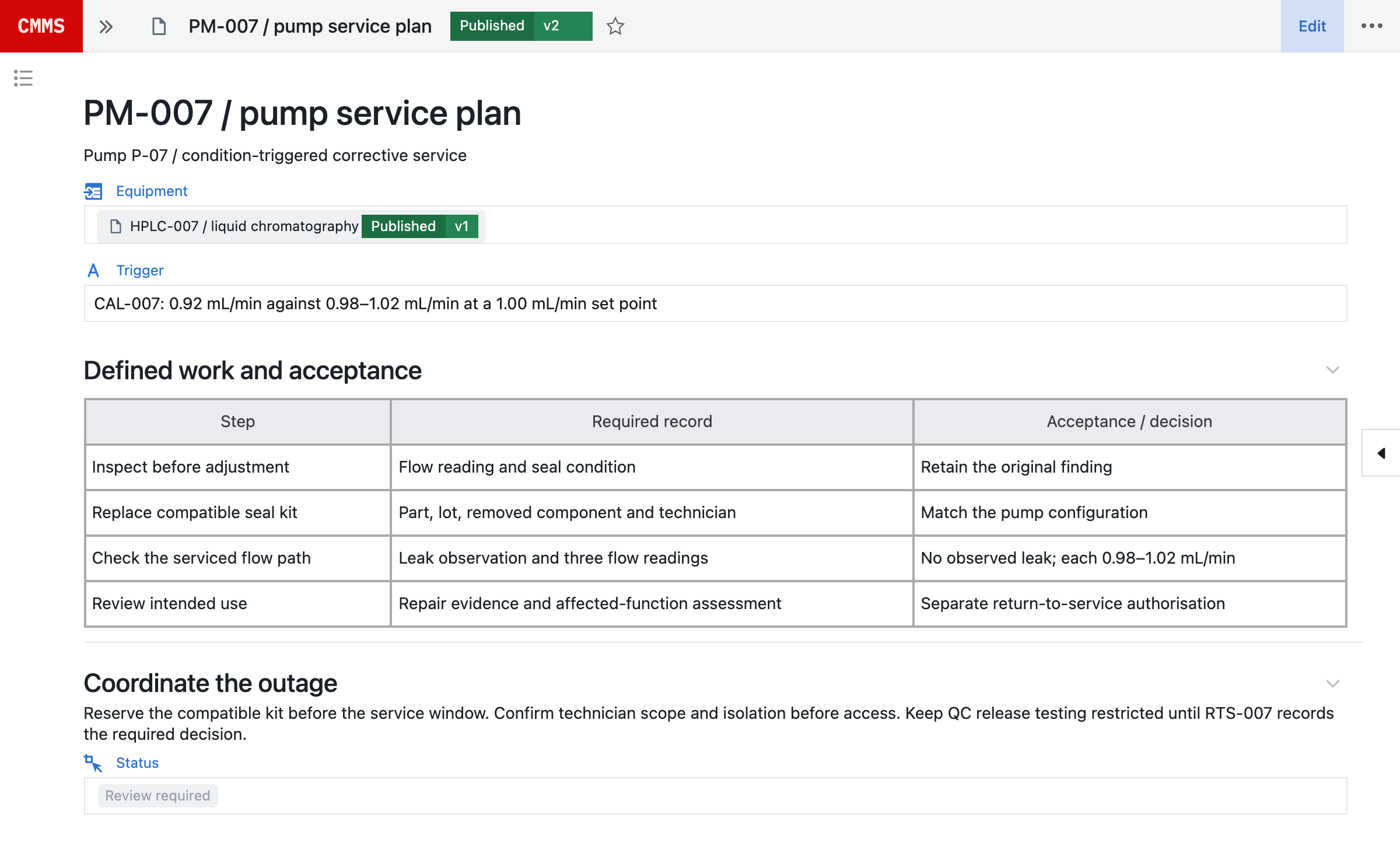
The PM-007 record below puts the equipment, trigger and required work in one place. The procedure identifies what to capture before adjustment and the checks to perform after repair, so a technician can see what the reviewer will need before starting.
Coordinate that plan with the production window, laboratory queue and resources. Record required skills and contractor scope, parts reservations, drawings, permits and isolation. Stock on hand is not proof of compatibility, and a proposed date is not confirmation of service access. Keep unresolved substitutions and prerequisites visible before committing the outage.
If work is deferred, retain the original due date, reason, risk assessment, authorisation and revised date. Use the asset’s function, failure history, product impact, redundancy and spare-part lead time to decide the plan depth, escalation and return-to-service review.
3Keep the repair, parts and measurements together.
The work order records what was found, what was done and what changed: original observations, actual start and finish, technician, installed and removed parts, lot or serial identities, configuration changes and supporting files.
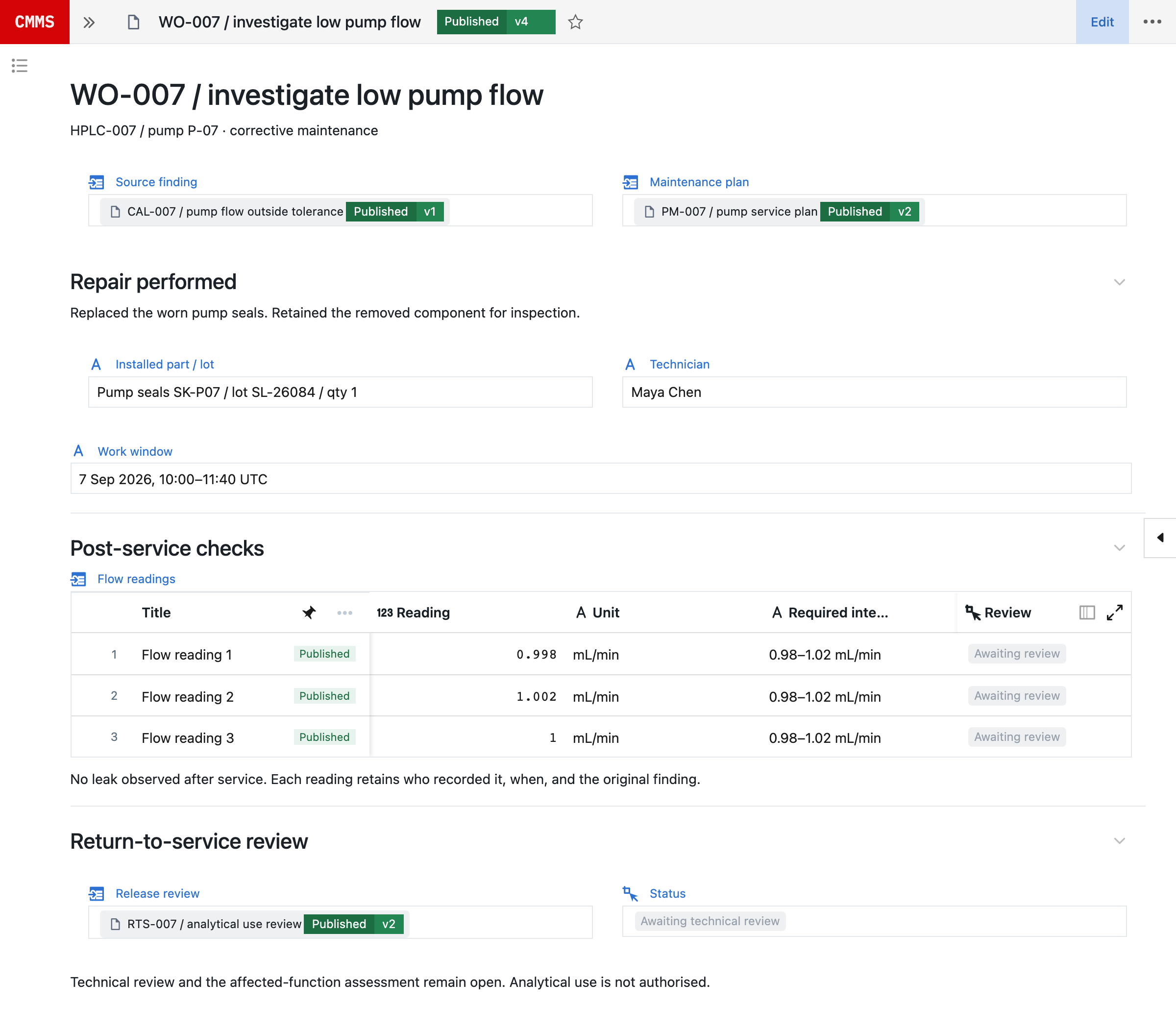
Link parts to their stock location, compatibility, reservation and inventory transaction, and retain unused returns and disposition with the job. This connected history lets the next investigation identify which other assets received the same part lot and which work used the equipment after installation.
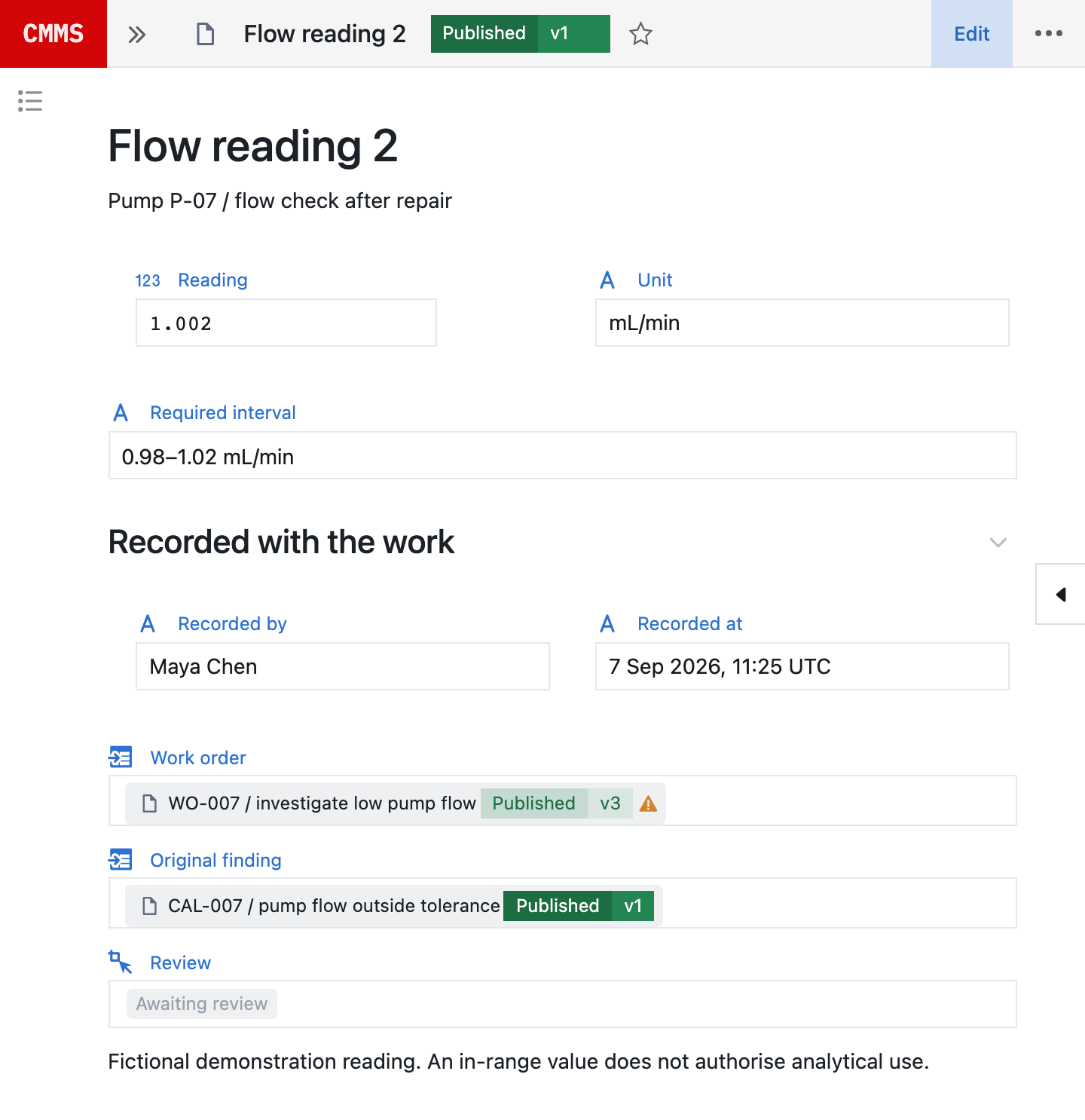
Each of WO-007’s three flow readings is a record in its own right. Its value and assigned interval stay with the recorder, timestamp, work-order version and original low-flow finding. A passing reading contributes evidence; it does not approve the repair.
Record a deviation from the plan with its reason and review. Give a temporary repair an explicit scope, limit, owner and follow-up. Neither should disappear into a note saying “fixed”. Verify the capture workflow on the devices and connectivity used at the equipment, including any scanning requirements.
4Completing the repair does not return the asset to use.
In this fictional HPLC-007 example, the three post-repair readings are within the assigned interval. Technical review and the affected-function assessment remain open. Analytical use is still restricted; the original 0.92 mL/min finding is retained.
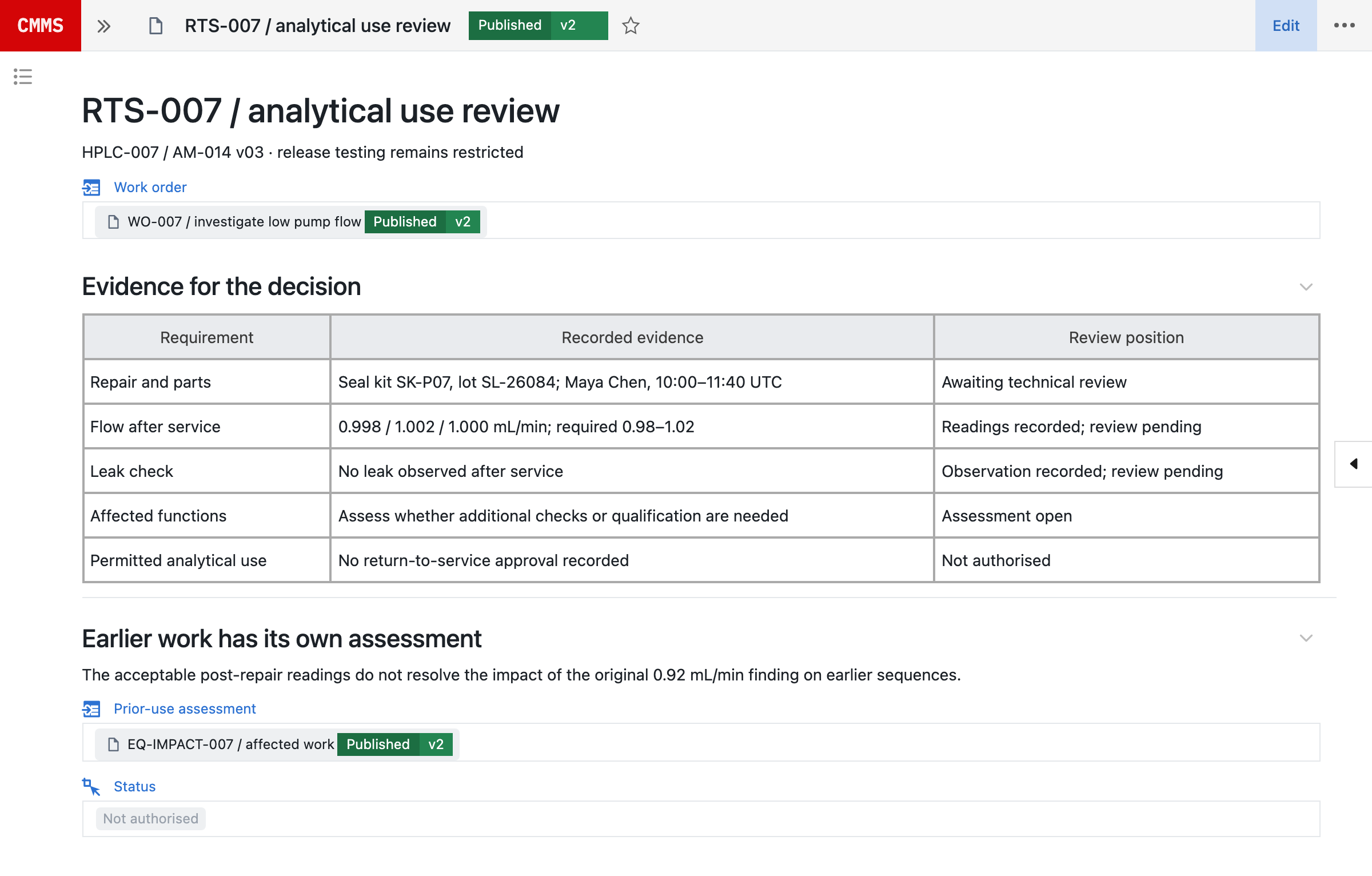
For the next use, review the repair record, post-maintenance checks, calibration, cleaning, configuration and outstanding restrictions. Where a restricted return is permitted, record the exact use, rationale, compensating controls, expiry and follow-up. Service access is not permission to produce reportable results.
4.1Investigate earlier work separately
Restoring the pump does not establish whether earlier results were affected. Keep the original finding, possible onset, service history and actual uses with the impact assessment. Maintenance supplies the technical evidence; laboratory, quality and operations assess the relevant samples, batches and outputs. An included use is a candidate for assessment, not an automatically invalid result.
The prior-use assessment, EQ-IMPACT-007, belongs to the equipment record: it links HPLC-007 and the CAL-007 finding to the uses in the review window. A deviation, where one is needed, links to the same instrument and candidate uses.
5Neil prepares the work. Your team decides.
Neil is Seal’s AI agent. Bring it a question, a procedure or an operational problem. It works across the records the requester is permitted to see, and what it produces is work in Seal: a linked assessment, a work package, a configured workflow or a changeset, not text to paste somewhere else.
| Neil prepares | Your team decides | |
|---|---|---|
| Investigation | Repairs, part lots and uses compared | Cause and affected work |
| Planning | A work package with its gaps | What is scheduled |
| Set-up | Templates and checks from a procedure | Whether it matches the work |
| Plan change | A changeset with its verification | Approval and release |
| Effectiveness | The population, window and events | Whether the change worked |
Find other pumps with this symptom. What do the failures have in common?
Neil
- Low flow on HPLC-007 and HPLC-011, from WO-007 and WO-012.
- Both took seal kits from lot SL-26084.
- A valve fault on HPLC-014, with a different seal-kit lot.
- HPLC-011 ran two sequences after the kit was installed.
- Evidence (met)Assembled, with sources
- Cause (not met)For the investigator
- Affected work (not met)For the investigator
To investigate, Neil compares repairs, installed-part lots, calibration and actual uses. It can create a linked assessment with competing explanations, affected-work candidates and the evidence still needed. A shared part lot is a lead to investigate, not proof of the cause.
To prepare a shutdown, it uses recorded production windows, plan requirements, stock and personnel qualifications to compare options, then creates linked preparation tasks and proposed work orders for the planner to review. Stock, personnel and access must be confirmed before scheduling.
From a procedure, it can author the job-plan and work-order templates, linked measurement records, required fields and review states, prepare verification cases, and write and lint scripts for operator-run testing. To improve a plan, it can assemble a changeset with requirement links, revised configuration, verification cases and training impact, and define an effectiveness review with the population, reporting window and source events to compare.
Nothing Neil produces takes effect on its own. Neil stages changes for review; authorised people check the configuration against the procedure, run the required verification, sign and publish the change, and authorise return to service. Existing work retains its version.
In line with the EU’s draft GMP Annex 22 on AI, Neil is not used in GMP execution. It helps set up configuration, which your team verifies and releases under change control. See how Neil fits Annex 22 and more about Neil.
6Improve the plan without losing the validated history.
A recurring fault can lead to an inspection change, a revised interval or a different spare strategy. Neil can assemble the supporting evidence and author the affected records and configuration in a changeset. Seal brings change control and continuous validation into the same platform, so the proposed process carries its requirements, verification and approval with it.²
- Trigger
- Flow out of tolerance
- Parts
- Seal kit SK-P07
- Checks
- Three flow readings
- Used by
- WO-007
- Add
- Inspect before adjusting
- Require
- Linked readings to close
- Verify
- Missing or failed reading
- Review
- Recurrence after release
Maintain the relevant URS, FS, DS and configuration specification (CS).³ Define risk-based automated verification and repeatable UAT for triggers, permissions, required evidence and release behaviour. Neil can prepare verification cases and write and lint scripts for operator-run testing; authorised people review the technical scope, execute the required checks, sign and publish the change.
Assess training impact and existing work before making the revision effective. Existing work orders retain the version they ran against. Software verification does not replace equipment qualification, calibration, maintenance testing or the authorised return-to-service decision. The continuous validation detail explains the risk-based assurance approach and responsibilities.
7Check whether the change improved reliability.
Define the equipment population, reporting window and source events before judging a maintenance strategy. A failure count alone cannot tell you whether a new plan helped. Mean time between failures needs operating time; mean time to repair needs a consistent definition of repair time; availability needs explicit downtime rules.
| Work order | Finding | Repair | Waiting |
|---|---|---|---|
| WO-101 | Seal leak | 2 h | 0.5 h |
| WO-102 | Valve failure | 3 h | 1 h |
| WO-103 | Seal leak | 1 h | 0.5 h |
- Scheduled
- 480 h
- Mean time to repair
- 2 h
- Mean time between failures
- 157.3 h
- Availability
- 98.3%
In this example, three work orders fall in a window of 480 scheduled hours. Mean time to repair counts active repair time only: 6 hours over 3 failures is 2 hours, and waiting is retained separately. Downtime counts repair and waiting, with no planned stops or overlapping events, so the pump operated for 472 hours: 157.3 hours between failures, and 98.3% availability.
Neil can define an effectiveness review against the proposed change: compare recurring symptoms, downtime, parts and quality impact across the agreed population and window. Retain the calculation, exclusions and underlying events so the team can challenge the result. Decide whether the evidence supports keeping the interval, changing the inspection, training, condition monitoring or replacement.
8Start with one asset. Keep the rest connected.
Bring an asset, its maintenance plan, a real work order and the evidence needed to return it to use. Test the complete cycle: a missing part, deferred task, unexpected finding and failed post-repair check. Verify that the team can see the restriction, document the work, review the evidence and trace affected uses before extending the model to the next equipment family. To scope that first asset with us, book a demo.
An existing CMMS can remain the source of execution while Seal connects its work-order identity and status to equipment use, laboratory records and quality review. Define record ownership, the events crossing the boundary and how failed handoffs are detected. For a migration, reconcile assets, components, open orders, due dates, plans and historical evidence; preserve identifiers, approved versions and any source gaps.
References
- 121 CFR 211.67, Equipment cleaning and maintenance: equipment and utensils must be cleaned, maintained and, as appropriate, sanitised or sterilised at appropriate intervals under written procedures. eCFR
- 2EudraLex Volume 4, Annex 11, Computerised Systems (2011), sections 4 (validation) and 10 (change and configuration management). European Commission
- 3ISPE, GAMP 5: A Risk-Based Approach to Compliant GxP Computerized Systems, second edition (2022).
AConnected across Seal
BConnected records
CQuestions and answers
How does CMMS differ from the Equipment blueprint?
Equipment holds the asset identity, configuration, qualification, intended uses and operating restrictions. CMMS organises the work needed to maintain or restore it: plans, requests, work orders, parts and return-to-service review. They share the asset and evidence in Seal.
What should technicians see at the equipment?
The applicable job plan, asset history, scope, prerequisites and fields needed to record the work. Configure the workflow for the role and verify it on the devices and connectivity used on site; do not assume offline operation or a fixed training time.
How are emergency repairs handled?
Define an emergency path that prioritises safe containment, authorised scope and required immediate controls. Retain the original event time, work performed and any outstanding documentation. Emergency priority does not remove safety controls or the separate return-to-service decision.
Can contractors contribute to a work order?
Configure access for the contractor’s specific scope. Define which records can be read, which evidence can be submitted and which decisions remain with the asset owner, operations or quality. Verify those permissions before use.
How does calibration connect to laboratory work?
The calibration event refers to the equipment used by the method. Configure required calibration and qualification checks in the execution workflow. An out-of-tolerance finding provides evidence for an assessment of prior uses; it is not automatic proof that earlier results are invalid.
Can we retain an existing CMMS or migrate its records?
Yes, with an agreed ownership and mapping model. Connect work-order identity, events and evidence to the relevant Seal records, or reconcile the asset hierarchy, plans, open orders, due dates and history during migration. Preserve approved plan versions and make any source gaps explicit.
What determines return to service?
The equipment, intervention and intended use determine the evidence. Relevant requirements may include repair records, function checks, calibration, cleaning, configuration review, remaining restrictions and authorised operations or quality acceptance. A closed work order alone is not that decision.
Can a plan use operating hours or condition readings?
Configure the trigger with its source, threshold or interval, time basis and required action. Retain the reading and plan version behind generated work. Verify source availability, duplicate-event handling and overdue behaviour before relying on the workflow.
How can Neil help improve maintenance?
Neil can investigate recurring failures across permitted records, create linked work packages, turn a procedure into reusable templates and measurement records, and author workflow changes in a change set. It can prepare verification cases, write and lint scripts for operator-run testing, and define an effectiveness review. Its output is editable work and configuration in Seal, not only a written recommendation. People review the evidence, execute required tests, sign and publish changes, and authorise return to service.
How do we change a validated maintenance workflow?
Keep the proposed change linked to requirements, risk assessment, configuration specifications, verification and approvals. Use relevant automated checks and repeatable UAT, assess training impact and retain the versions used by existing work orders. Equipment testing and return-to-service authority remain separate.