Summary
- The problem
- Calibration certificates, logbooks and maintenance records sit apart, so a status label stands in for whether an instrument suits a particular use. When a check fails, finding the results that relied on it means reconstructing the history by hand.
- Seal’s approach
- Calibration, qualification, cleaning and maintenance evidence connects to the workflow that selects the asset, so a missing prerequisite stops the configured path. Recorded uses link to samples and batches, so a failed check leads to the work that needs assessment.
- Neil
- Seal’s AI agent assembles the uses since the last acceptable check, with their evidence and what is missing, and drafts asset records from manuals and certificates. Your team reviews and decides. About Neil.
- What changes
- An equipment event opens with its candidate uses already linked. Return to service and the assessment of earlier results remain separate, visible decisions with their own evidence.
- What it covers
- Calibration, maintenance, logbooks, training and deviations, connected to laboratory and manufacturing work.
- Where to start
- One equipment family, its current evidence and one method or process that uses it. Book a demo.
1A system of record keeps the certificate. Seal checks it at the point of use.
A traditional CMMS or calibration system is a system of record for the asset. It holds due dates, certificates and work orders, while the uses that matter sit in logbooks, batch records and LIMS entries. It can show that an instrument was due. On its own, it cannot stop a method from using that instrument, or show which batches relied on it when a check fails.
Seal records the asset, its evidence and each use on the same platform as the method and the batch step. Readiness is checked for the task when the workflow selects the equipment, and a missing prerequisite stops that path with the reason recorded. When a check fails, the recorded uses lead to the samples, results and batches that need assessment, and Neil can assemble that review for your team.
| A traditional CMMS | Seal | |
|---|---|---|
| Where it sits | Beside the work | In the method and the batch step |
| Readiness | A status on the asset | Checked at the point of use |
| Uses | Logbooks and batch records | Recorded with the execution |
| A failed check | History rebuilt by hand | Linked to the uses it affects |
| Change after go-live | A revalidation project | A change with its verification |
| AI | Text to paste elsewhere | Neil assembles the review |
| Getting started | An implementation project | One equipment family |
Intervals, eligibility rules and logbook forms can be tightened from experience and released under change control, and each earlier use keeps the rules that applied when it happened. You do not need to replace an existing maintenance system to start. Agree which system owns asset identity, work orders and calibration results, and Seal checks that evidence where the work runs.
2Readiness is decided for the use, not the asset.
A current calibration is one prerequisite.¹ A release test may also require a qualified range, a particular configuration, a clean state and an authorised analyst, and an instrument that does not meet its specification is not used for it.²
Method AM-014 v03
- Calibration (not met)Outside tolerance
- Repair checks (not met)Evidence required
- Release (not met)Not authorised
Pump P-07 repair
- Work order (met)Authorised
- Repair evidence (not met)Required
- Sample results (not met)Not reportable
Configure those requirements in the workflow that selects the equipment. Record the asset, intended use, applicable rules and supporting evidence with the execution. A failed or missing prerequisite stops that configured path and makes the reason clear. Maintenance restrictions and open investigations can change which uses are permitted.
The restriction belongs to the intended use. HPLC-007 can be blocked for release testing while an authorised work order on pump P-07 goes ahead, and that service work produces no reportable sample results. Keep any permitted exception’s scope, rationale and approval with that work.
Qualification follows the same logic. Start with the user requirements and the function the equipment must perform. Link the design and configuration to the applicable installation, operational and performance qualification evidence, deviations, limitations and release decisions.
An exploratory measurement, a release test and a process-control measurement may require different evidence even when they use the same instrument model. Define controls around the actual use and its risk.
Operator eligibility belongs in that context too. Link the task and procedure revision to the training or demonstrated competence it requires. An acknowledgement is not a substitute for an observed assessment where that assessment is required.
3A failed calibration is also a question about earlier work.
When an instrument fails a check, the work it did since the last successful calibration needs assessment.³ Seal follows the recorded uses from the instrument to the acquisitions, methods, samples and batches in that window.
HPLC-007, review window
- 1 SeptemberFlow check1.00 mL/min
- 3 SeptemberUSE-041Batch B-041
- 5 SeptemberUSE-042Batch B-042
- 7 SeptemberFlow check0.92 mL/min
On 7 September, HPLC-007 measured 0.92 mL/min at a 1.00 mL/min set point, against an acceptance interval of 0.98–1.02 mL/min. The last acceptable check was on 1 September. Two release tests used the instrument in between: USE-041 for batch B-041 and USE-042 for batch B-042. The earlier check is a review boundary, not proof of when the failure began.
A recorded use is a starting point for investigation, not a verdict. Assess each use on its own evidence, such as its acquisition and suitability checks; a shared instrument does not establish a shared impact. Record why a use is included or excluded.
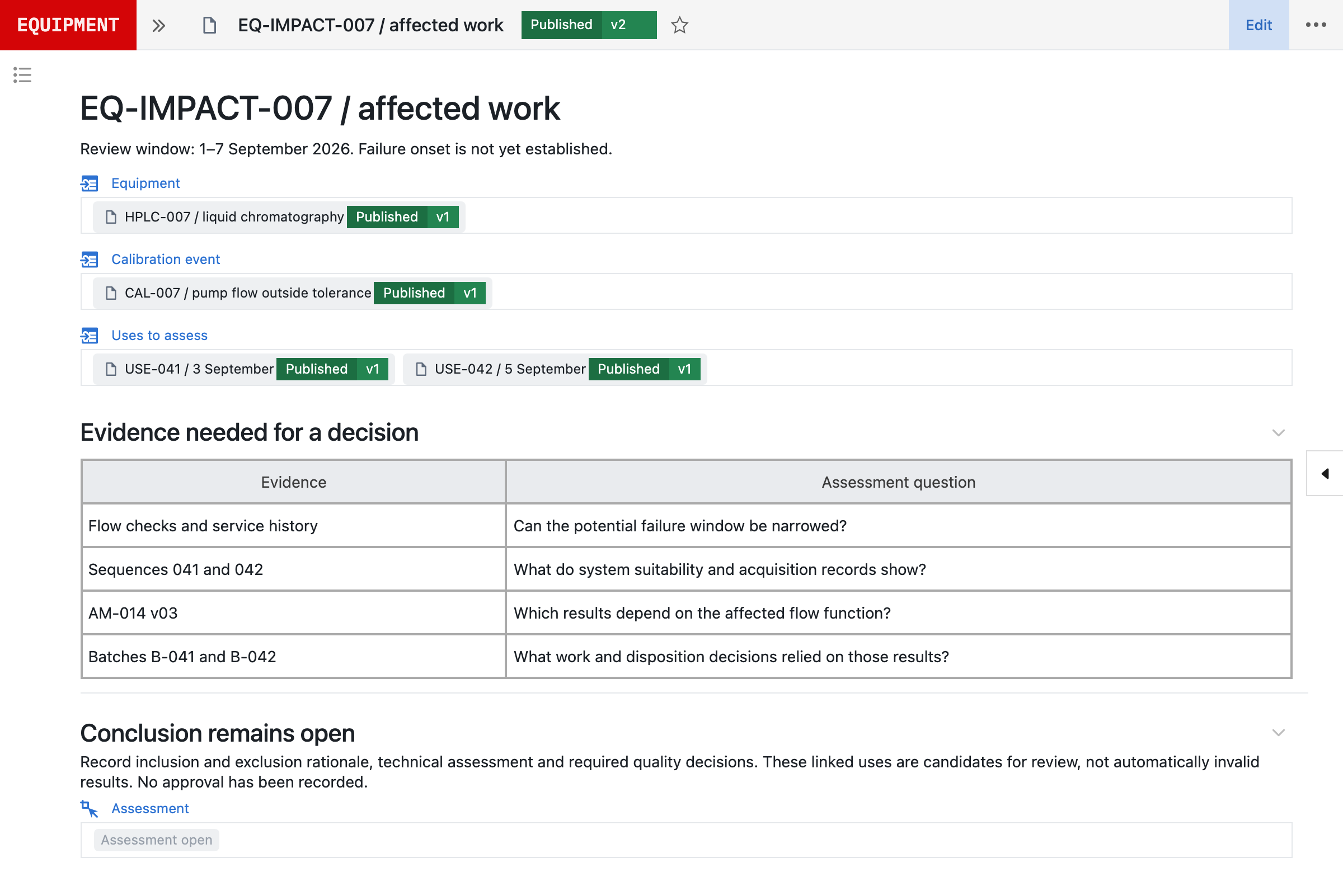
Return to service and the assessment of earlier results are separate decisions with their own evidence. Repairing the instrument and passing an as-left check do not resolve the results it produced before.
4Neil prepares the review. Your team decides.
Neil is Seal’s AI agent. It works across the same equipment, calibration and use records your team does, within the permissions of the person asking, and prepares the work for review: the candidate uses, the evidence behind them and what is missing.
| Neil prepares | Your team decides | |
|---|---|---|
| Set-up | Asset records from manuals | Intended use and tolerances |
| A failed check | Uses since the last good check | Which uses are in scope |
| Evidence | Service history and gaps | Technical impact |
| Follow-up | Evidence requests for owners | Disposition of each batch |
| A better control | The proposed requirements | Approval and release |
| Return to service | The evidence still required | Whether it is released |
Ask Neil: “Which results used HPLC-007 between the last acceptable flow check and today’s failure?” It answers from the recorded uses, with each fact traced to its record.
Which results used HPLC-007 between the last acceptable flow check and today’s failure?
Neil
- Last acceptable flow check on 1 September, 1.00 mL/min.
- USE-041 on 3 September: sample S-041-12, batch B-041.
- USE-042 on 5 September: sample S-042-08, batch B-042.
- Both ran method AM-014 v03, in sequences 041 and 042.
- Uses recorded outside Seal: not searched.
- Candidate uses (met)Assembled, with sources
- Impact (not met)For the reviewer
- Return to service (not met)Authorisation required
Follow-up questions work the same way: which methods depend on the affected range, whether the symptoms appeared after a service visit, which batches relied on the results. Neil can only trace use that was recorded and is accessible, so a gap in the history stays visible rather than reading as “no use”. The supporting records stay with the draft assessment, so reviewers can inspect its basis. A worked example follows a balance through the same review.
If the investigation points to a better control, Neil can prepare the proposed requirements, and Seal keeps the change, its verification and its approval connected to the process it improves. Nothing Neil prepares takes effect until a qualified person has reviewed it.
In line with the EU’s draft GMP Annex 22 on AI, Neil is not used in GMP execution. It helps set up configuration, which your team verifies and releases under change control. See how Neil fits Annex 22 and more about Neil.
5Connect every dependency to the instrument.
Give each asset a stable identity, then connect its components and operating context. A component replacement can then lead to the methods, qualification evidence and work that need assessment.
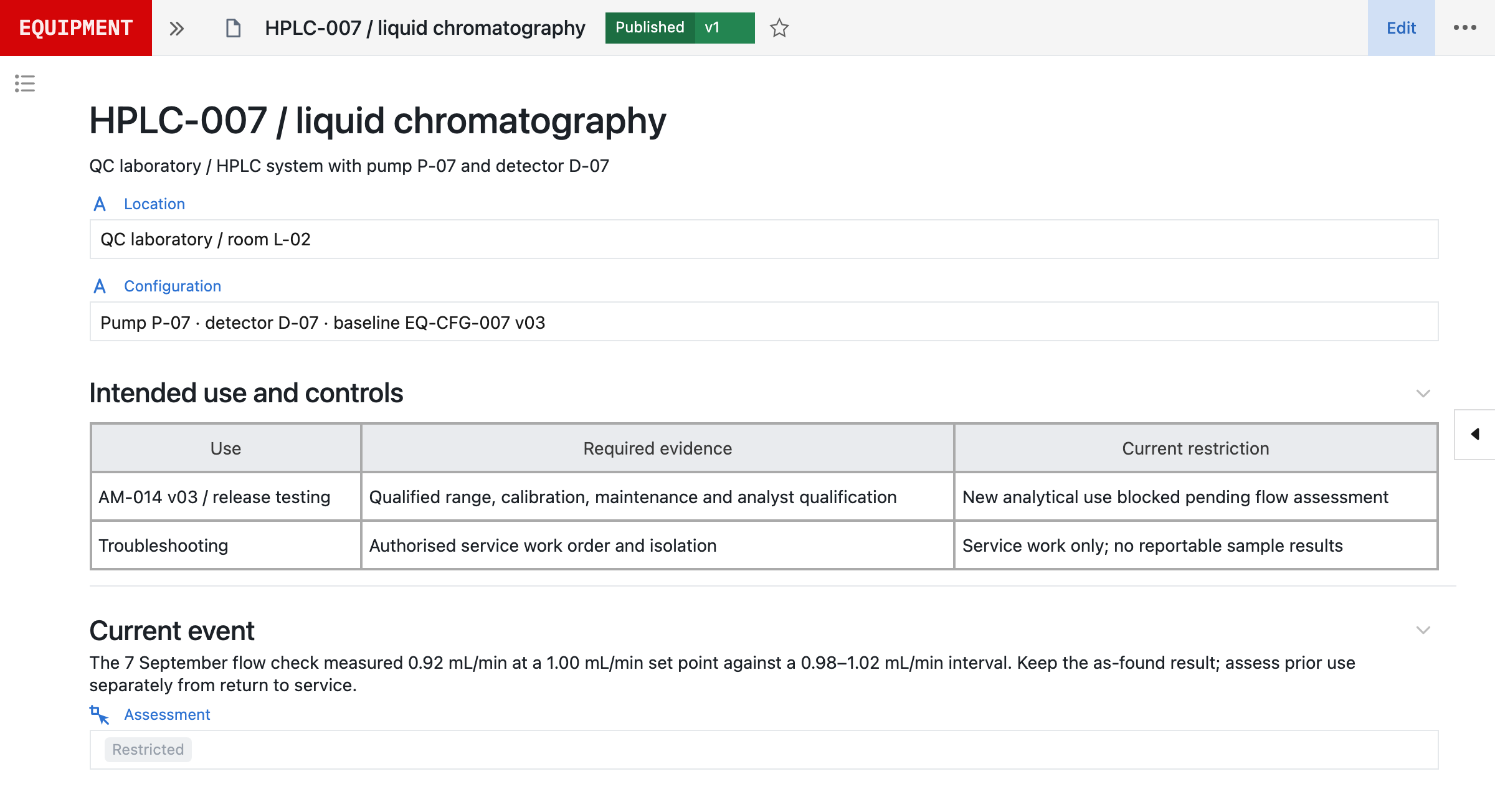
For an HPLC, the record may include the pump, detector, data system, firmware, qualified ranges and permitted methods. For a vessel, it may include the probes, utility connections, cleaning procedure and production recipes.
Location, custodian, serial number, manufacturer and intended use remain useful fields. The relationships are what make the record operational.
Barcode selection helps connect the physical asset to its record. The scan identifies the equipment; the configured checks determine whether it is suitable for the requested use.
6The logbook stays with the batch and the result.
Under 21 CFR 211.182, the use of major equipment is logged with the date, time, product and lot number of each batch processed.⁴ When equipment selection and release are part of a Seal workflow, that entry is made as the work happens, and the same use record can be reached from the equipment and from the batch or laboratory activity.
| Recorded with the use | USE-041 |
|---|---|
| Equipment | HPLC-007 |
| Task | Release testing |
| Method | AM-014 v03 |
| Sample | S-041-12 |
| Batch | B-041 |
| Started | 3 September, 09:15 UTC |
| Acquisition | Sequence 041 |
Capture what matters to the use: method or recipe version, function, range, configuration, observations and relevant checks. For equipment shared between activities, define how reservations, concurrent use and release should behave instead of assuming every asset has the same operating pattern.
Usage recorded in an external system needs an explicit connection or import. Establish identifiers, timestamp handling and the source of truth; missing history must remain visible rather than appearing as “no use”.
7Cleaning, calibration and maintenance answer different questions.
Each kind of evidence answers its own question about the equipment. Keep the records distinct and assess them together before a use.
| Evidence | The question it answers | What it does not show |
|---|---|---|
| Calibration | Is it measuring within range? | That a restriction is lifted |
| Cleaning | Is it clean for the next use? | That it measures correctly |
| Maintenance | What work was done? | Release for regulated use |
A calibration record keeps its as-found result before any adjustment, and leaves return to service and the impact on earlier work as decisions of their own.
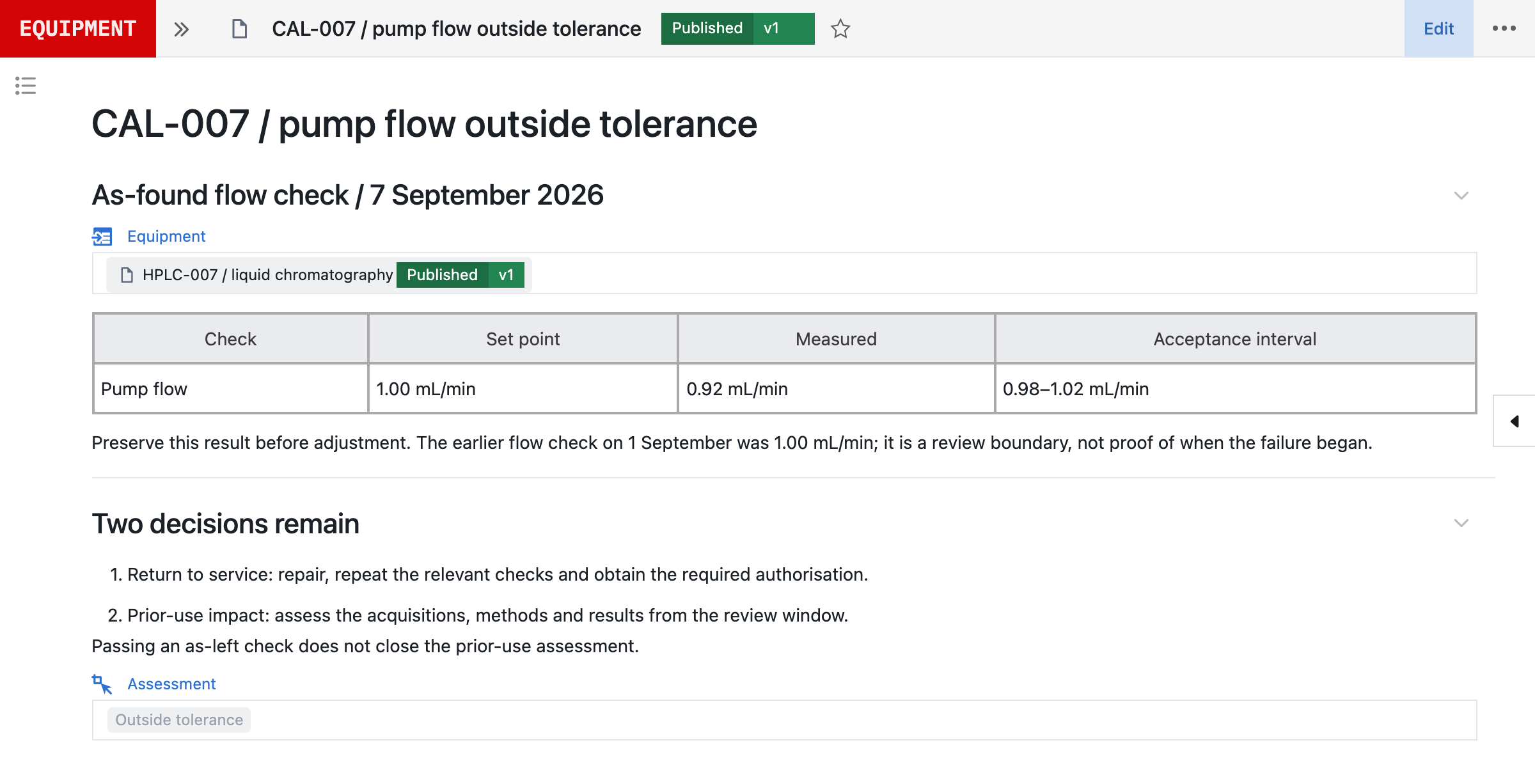
Cleaning records can retain the procedure version, execution, inspection or sampling results, dirty and clean hold times, and the relevant product or campaign. Maintenance records can retain the task, parts, technician, observations, vendor report and follow-up checks.⁵ Maintenance work and laboratory execution connect to the same asset, so each record is read with the use it affects.
8Change the controls without losing their history.
A new method, firmware update, relocation or replacement component can change the operating requirements. Seal keeps the reason for change, affected assets, impact assessment, proposed configuration, verification and approval together in one controlled change.
| Change | What to reassess |
|---|---|
| A new method | Permitted uses and the evidence each requires |
| Firmware or software | The configuration baseline and its verification |
| Relocation | Location, utilities and qualification |
| A new component | Methods, qualification evidence and open work |
| Retirement | Remaining work, data retention and interfaces |
Continuous validation and change control are integrated into the platform. Maintain the URS, FS, DS and configuration specification (CS) alongside the configured workflows.⁶ Use automated verification and repeatable UAT checks to assess changed behaviour: an expired prerequisite, a missing qualification, a restriction during use or a new permitted range. The continuous validation detail explains the risk-based approach and responsibilities.
The equipment still needs the physical qualification and calibration evidence appropriate to its intended use. Software verification does not replace that work. It provides evidence that the digital controls behave as specified.
Retain the previous version and the evidence used for historical executions. Release the changed configuration through the required review, training and effective-use decisions.
Retirement is the last change, and it involves more than an inactive flag. Assess decontamination, remaining work, replacement dependencies, data retention, interfaces, software access, components and service arrangements. Preserve the asset identity and historical relationships after removal: a result produced years earlier should still lead to the equipment, configuration and evidence that supported it.
9Begin with one equipment family.
Bring an equipment list, its current evidence and one method or process that uses it. A useful evaluation tests the exception paths as well as the normal flow: select an eligible asset, restrict it, trace its prior uses, assess a change and demonstrate the evidence required before returning it to service.
| Where it is today | What Seal uses | How it reaches Seal |
|---|---|---|
| A CMMS | Assets and work orders | Blue Mountain RAM, IBM Maximo |
| Instruments | Original files | The Seal IoT agent |
| Manuals | Asset details and ranges | Neil drafts the records |
Equipment inventories, manuals, service reports and calibration certificates contain much of the starting context. Neil can help turn those sources into proposed asset records, specifications and workflow requirements. Review identifiers, component relationships, dates, units, ranges and recommendations against the originals, and resolve missing or conflicting information before relying on it. A manufacturer’s recommendation is input to the assessment, not automatically your approved calibration interval or maintenance strategy.
Keep an existing CMMS responsible for maintenance planning if it already serves that purpose. Agree which system owns asset identity, work orders, calibration results and current restrictions, and how updates reach the execution workflow. MaintainX and Fiix connect the same way, and all integrations are scoped like this before they go live.
The Seal IoT agent supports configured file capture from an instrument workstation; see scientific data capture for how the original file stays with the result. Capture is different from qualification: retaining an original file does not establish that the instrument was suitable for the work.
Book a demo with one equipment family, and we can scope the asset model, usage capture, point-of-use requirements and review responsibilities around that real operation.
References
- 121 CFR 211.68, Automatic, mechanical, and electronic equipment: computerised and automated equipment must be routinely calibrated, inspected or checked under a written program; changes to master production and control records may be made only by authorised personnel, input and output must be checked for accuracy, and backup data maintained. eCFR
- 221 CFR 211.160(b)(4), Laboratory controls, general requirements: instruments must be calibrated at suitable intervals under a written program with limits and remedial action, and instruments not meeting established specifications shall not be used. eCFR
- 3ICH Q7, Good Manufacturing Practice Guide for Active Pharmaceutical Ingredients (2000), sections 5.34 and 5.35: instruments that do not meet calibration criteria should not be used, and deviations on critical instruments should be investigated for impact since the last successful calibration. ICH
- 421 CFR 211.182, Equipment cleaning and use log: major equipment cleaning, maintenance and use are recorded in individual equipment logs that show the date, time, product and lot number of each batch processed. eCFR
- 521 CFR 211.67, Equipment cleaning and maintenance: equipment and utensils must be cleaned, maintained and, as appropriate, sanitised or sterilised at appropriate intervals under written procedures. eCFR
- 6ISPE, GAMP 5: A Risk-Based Approach to Compliant GxP Computerized Systems, second edition (2022).
AConnected across Seal
BConnected records
CQuestions and answers
What happens when equipment is out of calibration?
Configure which intended uses are blocked when a due condition is reached or a result fails its acceptance criteria. Keep the restriction, affected function and evidence explicit. A permitted exception, if your process allows one, needs a separate authorised scope and rationale; it is not an unrecorded operator bypass.
Can we have a grace period after calibration expires?
Define advance reminders, due conditions and any authorised extension process in the calibration plan. An extension needs its basis, scope, approval and end date retained. Do not treat an overdue calibration as current simply because an operator acknowledges a warning.
How is equipment usage captured?
Include equipment selection, relevant checks and release in the laboratory or manufacturing workflow. Those steps can retain the asset, operator, timestamps and linked activity. Usage outside Seal requires a configured integration or explicit recording; an empty log does not prove the instrument was unused.
Does a failed calibration invalidate every earlier result?
No. Use the affected function and evidence to establish a review window and candidate population. Assess method dependence, acquisition data, suitability checks, service history and supporting evidence. Record why a use is included or excluded. Technical assessment and product disposition require the appropriate people.
Does a successful repair close the investigation?
No. Return to service and prior-use impact answer different questions. Retain the as-found result, repair evidence, relevant as-left checks and authorisation for future use. Keep the assessment of historical results and affected work open until its required decisions are complete.
Can we track vendor service contracts and visits?
Link service arrangements and vendor reports to the asset or equipment family. Configure the fields and workflow for planned visits, performed work, technicians, parts, dates and follow-up requirements. A vendor report can support review without becoming an automatic return-to-service approval.
Can we keep our existing CMMS?
Yes. Define which system owns asset identity, planning, work orders, calibration evidence and restrictions. Agree identifiers, exchange direction, update timing and failure handling. Verify how an external status change affects the execution workflow before relying on the connection.
Do all instruments need the same controls?
No. Configure by intended use, equipment family and risk. Research, release testing and process control may need different evidence. States, concurrency, cleaning and reservation rules should reflect the actual operating pattern rather than a fixed four-state model.
How do we migrate from spreadsheets?
Start with one equipment family. Reconcile identifiers, components, location, current evidence and open restrictions. Keep imported history distinguishable from newly recorded work. Agree migration checks and missing-data treatment before relying on the records; scope determines the rollout.
Does this support barcode selection?
Equipment selection can use a supported barcode workflow to resolve an asset identity. Verify the scanner, label format and target device as part of implementation. The workflow must still check identity and applicable use requirements; scanning does not eliminate every selection error.
What does Neil do with equipment documents?
Neil can help extract and organise proposed attributes and requirements from manuals, inventories and certificates, then prepare a change for review. Check values, units and recommendations against the source. Qualified owners decide the intended use, intervals, tolerances and approved configuration.
How do the controls evolve after go-live?
Use integrated change control and continuous validation to keep the proposed configuration, specifications, verification and approvals together. Maintain URS, FS, DS and CS as applicable, with automated verification and repeatable UAT checks for changed behaviour. Physical equipment qualification and calibration remain separate evidence requirements.