Summary
- The problem
- An environmental result arrives days after the operation it describes, so linking a count to the work that was running is manual reconstruction.
- Seal’s approach
- Each sample keeps its location, collection window, media and incubation, and review rules are versioned. The collection time, not the read date, identifies which work overlapped.
- Neil
- Seal’s AI agent traces a signal into the operations that overlapped its collection, prepares the investigation and drafts any programme change. Your microbiologists and quality team decide. About Neil.
- What changes
- A rising series raises review work with its rule and source attached, and changes to the sampling plan preserve the history of earlier and missed collections.
- Where to start
- One sampling point or trend you need to investigate, with its procedure and recent results. Book a demo.
A traditional EM system files the count. Seal keeps the work it describes.
A traditional environmental monitoring system is a log of results. It files the plate, the count and the date it was read, while the batches, interventions and cleaning that the sample describes are recorded somewhere else.
| A traditional EM system | Seal | |
|---|---|---|
| Result timing | Filed by the read date | Traced from the collection window |
| Sample record | A count in a log | Count, volume, media and incubation |
| Missed or invalid | Easy to read as a zero | A distinct outcome, with its reason |
| Review trigger | A breach noticed by hand | A versioned rule raises the review |
| Affected work | Searched for afterwards | Operations in the same interval |
| Programme change | The plan edited in place | A new version; history kept |
| AI | Text to paste elsewhere | Neil prepares the investigation |
| Getting started | A replacement project | One sampling point, beside your LIMS |
A culture-based result describes the air, surface or person sampled days earlier. By the time the plate is read, the batches that ran during collection may have moved on. When samples, locations and production records sit in separate systems, linking a count to the work it describes is manual reconstruction, and it begins only once the result is known.
Seal keeps each sample with its location, collection window, media and incubation, beside the batch and intervention records, so the investigation starts from the collection time. Review rules are versioned. When the sampling plan or a rule changes, it becomes a new version with its own approval, and earlier and missed collections keep the plan they were taken under.
For sterile manufacture, EU GMP asks for exactly that reach. When an action limit is exceeded, the operating procedure should prescribe a root cause investigation and an assessment of the potential impact to product, including the batches produced between the monitoring and the reporting.¹ The same monitoring information is used for routine batch certification and for investigation.²
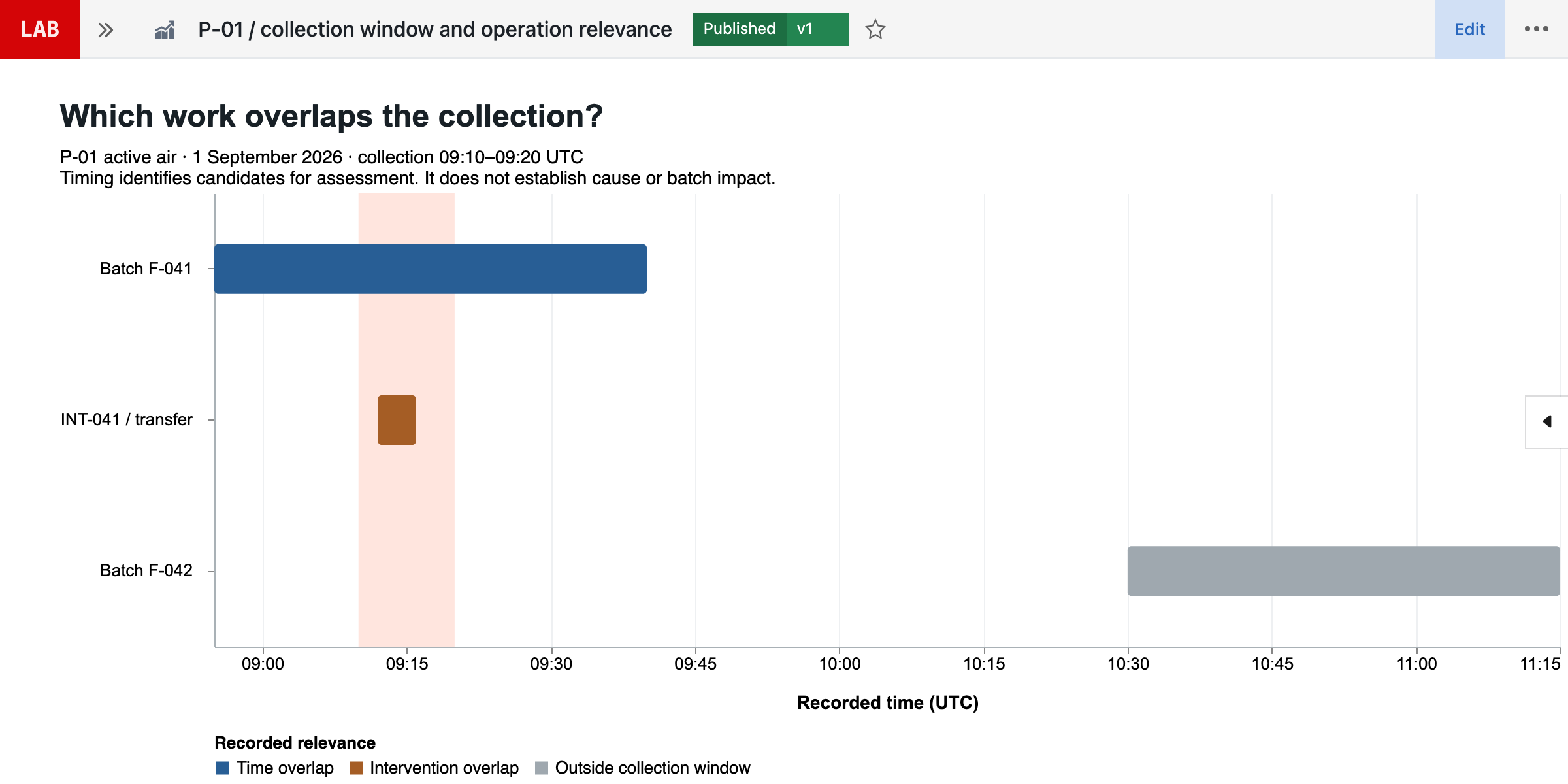
Figure 1 follows one sampling point. EM-026-03 was collected at P-01 on 1 September, from 09:10 to 09:20 UTC, and read on 7 September: eight colonies in 1.00 m³ of air. It is the third successive increase at P-01, so rule EM-R-04 v02 raises signal EM-SIG-026, although the count is below the rule’s action threshold of 10 CFU/m³. The collection window then finds the work that overlapped it: batch F-041 and the INT-041 transfer. F-042 started later. The sections below follow that sample from its record to the programme change it may lead to.
You can start with one sampling point or trend, alongside the LIMS you already run: Seal connects to samples, tests and results in systems such as LabWare, LabVantage and SampleManager. The advantage grows as monitoring, the laboratory and manufacturing share the same records: fewer counts carried by hand between systems, and an investigation that starts from the work rather than from a search for it.
The collection time, not the read date, finds the work.
A sample record keeps its collection window, sampled volume, media and incubation, so the count can be read back against the work that was running. The read date says only when the answer arrived.
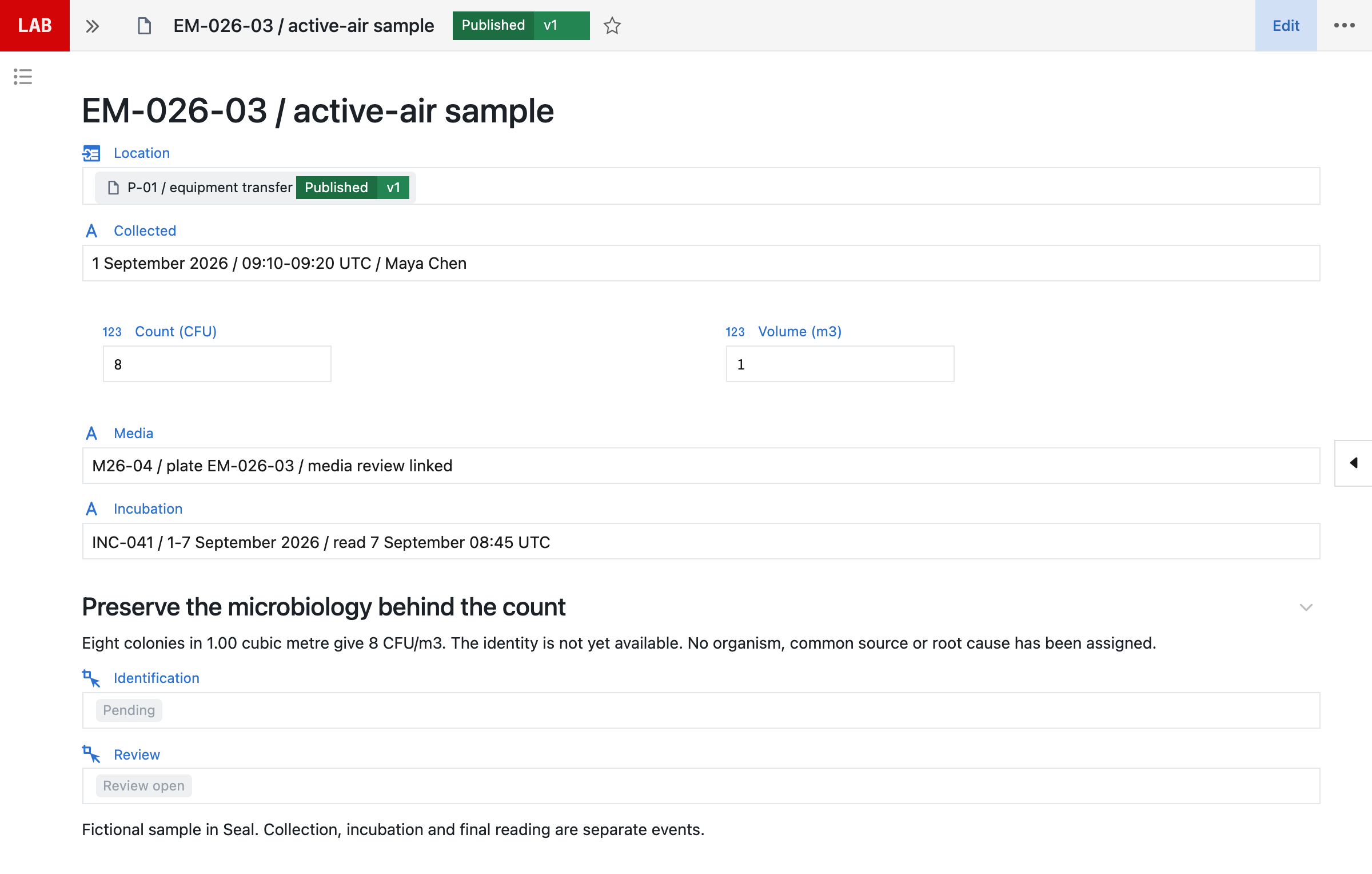
EM-026-03 was collected at P-01 on 1 September, from 09:10 to 09:20 UTC. Its final read was recorded on 7 September at 08:45 UTC, at the end of incubation INC-041. The read date does not identify which batch was running; the collection time does.
The record retains eight colonies, 1.00 m³ of air, media M26-04 and incubation INC-041. Collection, incubation and the final read are separate recorded events, each with its own time. Organism identification is pending, so no organism, common source or root cause has been assigned.
An unread plate, a zero count and an invalid result are recorded as different outcomes, because each leads to different follow-up. A missed or invalid sample must not become a zero count or disappear from schedule adherence; it keeps its reason, its assessment and any replacement or follow-up work.
Annex 1 asks for the programme to be set by risk assessments that establish the sampling locations, the frequency of monitoring, the methods and the incubation conditions, and for those assessments to be reviewed regularly.³ Each sample carries those choices with it: the location and method it was taken under, the media lot it used and the incubation it went through.
Find the work that overlapped the collection.
Seal compares the collection window with the recorded production and interventions, and keeps the result as an assessment: which work overlapped, why each candidate is included or excluded, and what evidence is still missing.
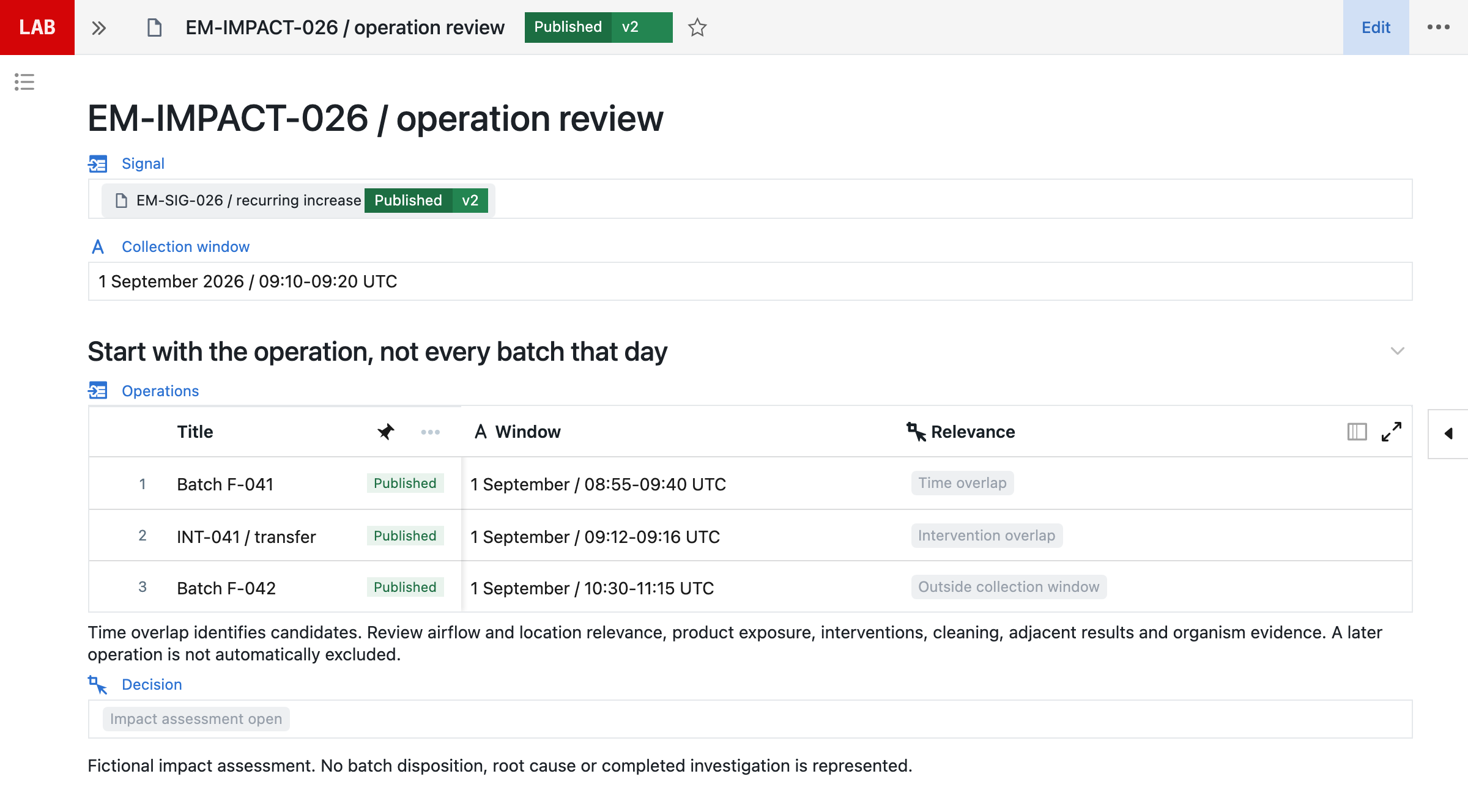
| Operation | Window (UTC) | Relevance |
|---|---|---|
| Batch F-041 | 08:55–09:40 | Time overlap |
| INT-041 transfer | 09:12–09:16 | Intervention overlap |
| Batch F-042 | 10:30–11:15 | Outside the window |
Batch F-041 and an equipment transfer overlap the collection; F-042 starts later. Timing narrows the candidate work, but it does not establish contamination or batch impact. Location, airflow, product exposure, interventions, cleaning, adjacent results and organism evidence still need assessment, and a later batch is not automatically excluded if a condition could have persisted.
Annex 1 asks for monitoring that captures all interventions and transient events,⁴ and for the potential impact of an organism found in grade A or B areas to be evaluated for each batch implicated.⁵ Keeping the candidate operations, their inclusion and exclusion reasons, the missing evidence and the resulting review together lets that evaluation start from the record instead of from schedules and logbooks.
The impact assessment stays open until the people responsible complete it. An overlap in time is evidence to assess, not a cause, and product disposition is a separate decision with its own authority.
A signal needs its rule and its source.
A signal in Seal keeps the rule version, the population and the source observations that raised it, so anyone can see why it appeared. A recurring increase stays separate from an identified organism or an established cause.
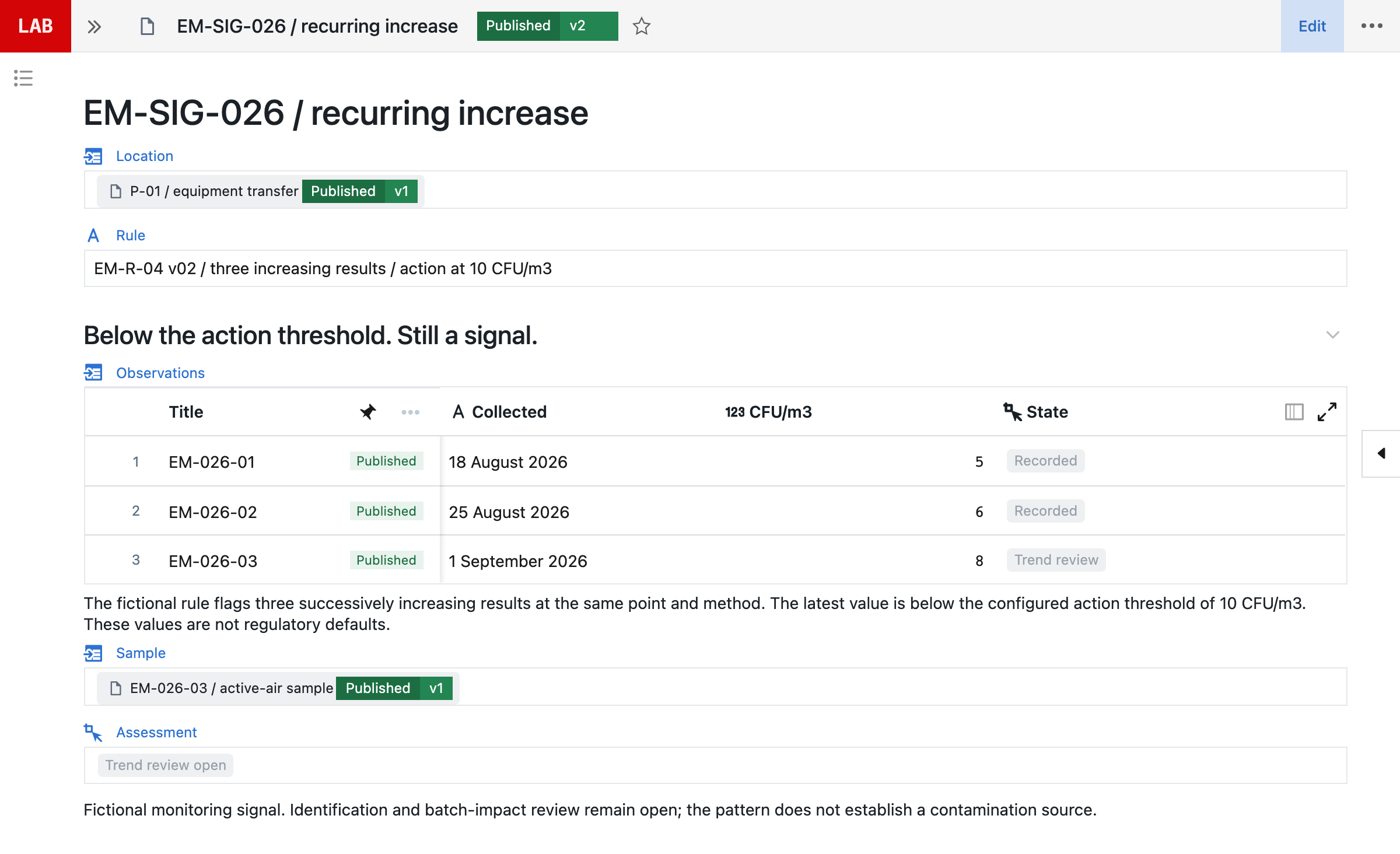
The three observations at P-01 are 5, 6 and 8 CFU/m³, collected on 18 August, 25 August and 1 September. The example’s EM-R-04 v02 rule raises a review for three successively increasing results at the same point and method, even below its action threshold of 10 CFU/m³. These are fictional support-area criteria, not cleanroom-grade limits or regulatory defaults.
Annex 1 asks for alert levels set so that adverse trends are detected, and for monitoring procedures to define the approach to trending.⁶ The trends it names map to what a signal keeps:
| Trend named in Annex 1 | What the signal keeps |
|---|---|
| Increasing excursions | The rule, period and source results |
| Consecutive alert excursions | Each result and the level it crossed |
| Regular isolated excursions | The operations at each excursion |
| Changes in microbial flora | Identifications, method and confidence |
Retain the rule version, population, period, exclusions, source observations and outcome, so the signal can be reproduced later. The example compares three successively increasing results at one point and method; it is not a statistical contamination-
When an alert level is exceeded, Annex 1 asks for assessment and follow-up, including consideration of an investigation or corrective action.¹ A configured workflow can prepare a linked investigation with the source samples, the rule and the context; EU GMP asks for the results of monitoring to be taken into account in batch release and in the investigation of deviations.⁷ A generated record is not a completed investigation, an established root cause or a batch decision.
Neil prepares the investigation. Your team decides.
Neil is Seal’s AI agent. Ask it about a signal and it follows the location, sample and production records the requester is permitted to see, separates observations from possible explanations and prepares the investigation as work in Seal, not text to paste somewhere else.
| Neil prepares | Your team decides | |
|---|---|---|
| Chronology | Collection, read and overlapping work | Whether it is complete |
| Population | Candidate operations, with reasons | Which work is affected |
| Evidence | Requests for what is missing | Identification and impact |
| Workflow | Collection and result templates | Whether it matches the work |
| Programme | A proposed plan change | Approval and release |
Investigate P-01. What overlapped the collection window, and what evidence is missing?
Neil
- EM-026-03 collected 09:10 to 09:20 on 1 September.
- F-041 and the INT-041 transfer overlap the window.
- F-042 starts at 10:30, after the collection.
- Three increases under EM-R-04 v02, below 10 CFU/m³.
- Requests: identification, F-041 operation evidence.
- Chronology (met)Assembled, with sources
- Identification (not met)For microbiology
- Impact (not met)For quality
To trace the signal into the operation, ask Neil: “Investigate P-01. Compare the collection window with production, interventions and adjacent observations. Show what evidence is missing.” Neil can prepare a candidate population, a chronology and linked requests for identification and operation evidence. Ask it to explain the inclusion and exclusion reasons and the observations that would distinguish competing explanations.
To configure the sampling workflow, bring the procedure: “Turn this procedure into linked collection, incubation and result templates. Include the failure paths and verification cases.” Neil can author the required media, device, volume and time fields, source references, review states and rule configuration, with tests for a missed collection, an invalid count, an absent identification and a changed rule version. People run the verification and approve publication.
To prepare a programme change: “Use this investigation to propose a targeted monitoring change and define how we will assess whether it helped.” Neil can stage the revised plan configuration, requirement links, training-impact work and an effectiveness review with a defined population and source records. The proposed location or frequency still needs scientific assessment and authorisation.
These are illustrative requests and the work they prepare, not a recorded Neil session. People assess the evidence, verify configuration and approve decisions. Identification, impact assessment, programme changes and product disposition stay with the microbiologists and quality staff responsible for them.
In line with the EU’s draft GMP Annex 22 on AI, Neil is not used in GMP execution. It helps set up configuration, which your team verifies and releases under change control. Customer data is not used to train AI models, and the requester’s permissions govern what Neil can read. See how Neil fits Annex 22 and more about Neil.
Change the programme without rewriting its history.
A sampling point has a physical position, a method and a reason to exist. Seal versions its plan, frequency, volume, operational conditions and response rules, so a change takes effect from a known point and the collections before it keep the plan they were taken under.
| Programme element | Kept with each version |
|---|---|
| Location | Position, method and reason |
| Frequency | Risk rationale and effective date |
| Volume and conditions | The operational state to sample |
| Limits and trend rules | Population, exclusions and approval |
| Missed collection | Reason, assessment and follow-up |
Configure locations and frequencies from the approved plan, with the risk rationale and the effective version. Preserve the actual collection history and assess missed work. Keep missed or invalid collections when replacement work is created, so schedule adherence shows what happened rather than what was planned.
Annex 1 asks for the risk assessments behind the programme to be reviewed regularly to confirm its effectiveness,³ and for alert levels to be reviewed periodically against ongoing trend data.⁶ A programme change carries its reason, its proposed configuration and evidence that the programme remains suitable, and it is approved before it takes effect. An investigation can add targeted locations, times and methods without changing the approved routine plan.
The programme is reviewed as a whole: coverage, adherence, results, organisms, signals, investigations, changes and risks, with the decisions, actions and effectiveness that follow. Review monitoring alongside facility, cleaning and process controls and the site’s contamination control strategy, with authorised people deciding programme changes and product disposition.
Connect the instruments and the laboratory.
Monitoring results come from samplers, counters, incubators and the laboratory, each with its own timestamps and formats. Each source is connected under an agreed mapping, and the laboratory’s records stay in the laboratory’s workflow.
| Record | Kept by |
|---|---|
| Points, schedules and rules | The monitoring programme |
| Collection context | The monitoring programme |
| Programme review | The monitoring programme |
| Methods, media and incubation | Laboratory execution |
| Counts and reviewed results | Laboratory execution |
Instrument connections need source-specific mapping and verification for timestamps, units, gaps, duplicates and delayed files. Assess the interface for each source, whether an export, an API or another supported route, and verify original data, identities, units, timestamps, completeness and recovery from interruption. A vendor name does not mean every device and format is already integrated.
Culture-based findings include incubation and reading delays; they are not immediate sensor alarms. Where rapid microbiological methods are adopted, Annex 1 asks for validation that shows they are equivalent or superior to the established methods.⁸ Chamber events in a stability study need original sensor evidence and historical sample occupancy, and are assessed there rather than treated as a microbiological result.
The programme and the laboratory share sample identifiers, so the relationship survives between them. Where the laboratory runs in a LIMS outside Seal, the interface needs agreed ownership, mappings and verification. In the US, aseptic processing areas need a system for monitoring environmental conditions;⁹ keep its records connected to the work they describe.
Start with one sampling point.
Bring one sampling point or trend you need to investigate, with its procedure and recent results.
Neil prepares the collection, incubation and result templates and the review rule from the procedure, and your microbiologists inspect them against how the work should run. Start with sample material or arrange an NDA before sharing confidential records.
Test the complete cycle before you rely on it: a missed collection, an invalid count, an absent identification, a changed rule version and a signal that reaches the operations it overlapped. Verify both the allowed and the disallowed paths for the intended roles.
Seal can run beside the LIMS and monitoring systems you already use. Agree which system owns each record, which records Seal reads and how status crosses the boundary. To scope the first sampling point with us, book a demo.
References
- 1EudraLex Volume 4, Annex 1, Manufacture of Sterile Medicinal Products (2022), section 9.13: when action limits are exceeded, a root cause investigation, an assessment of the potential impact to product, including batches produced between the monitoring and the reporting, and corrective and preventive actions; when alert levels are exceeded, assessment and follow-up. European Commission
- 2EudraLex Volume 4, Annex 1 (2022), section 9.3: information from the monitoring systems is used for routine batch certification or release and for periodic assessment during process review or investigation. European Commission
- 3EudraLex Volume 4, Annex 1 (2022), section 9.4: an environmental monitoring programme established and documented, with risk assessments that set the sampling locations, frequency, methods and incubation conditions, reviewed regularly to confirm the programme’s effectiveness. European Commission
- 4EudraLex Volume 4, Annex 1 (2022), section 9.24: viable air monitoring performed so that all interventions, transient events and any system deterioration are captured. European Commission
- 5EudraLex Volume 4, Annex 1 (2022), section 9.31: microorganisms detected in grade A and B areas identified to species level, and their potential impact on product quality evaluated for each batch implicated. European Commission
- 6EudraLex Volume 4, Annex 1 (2022), sections 9.9 to 9.11: alert levels and action limits, alert levels reviewed against ongoing trend data and set so that adverse trends are detected, and monitoring procedures that define the approach to trending. European Commission
- 7EudraLex Volume 4, Chapter 1, Pharmaceutical Quality System (2013), section 1.4 (ix): the results of product and process monitoring are taken into account in batch release and in the investigation of deviations. European Commission
- 8EudraLex Volume 4, Annex 1 (2022), section 9.28: rapid and automated microbial monitoring methods adopted after validation has demonstrated their equivalence or superiority to the established methods. European Commission
- 921 CFR 211.42(c)(10)(iv), Design and construction features: aseptic processing includes, as appropriate, a system for monitoring environmental conditions. eCFR
AConnected records
BQuestions and answers
How is Seal different from our environmental monitoring system?
A traditional EM system is a log of results: it files the plate, the count and the read date, while the work the sample describes is recorded elsewhere. Seal keeps each sample with its collection window, media and incubation beside the batch and intervention records, raises signals from versioned rules and keeps programme changes as approved versions. You can start with one sampling point alongside the systems you run.
How does Neil help?
Neil traces a signal into the operations that overlapped its collection, prepares the chronology, the candidate population and requests for missing evidence, and can draft sampling templates or a programme change with verification cases. In line with the EU’s draft GMP Annex 22 on AI, Neil is not used in GMP execution. It helps set up configuration, which your team verifies and releases under change control.
How does this integrate with LIMS?
Connect the monitoring plan and collection event to controlled laboratory execution: media, incubation, counts, identification and review. Shared sample identifiers retain the relationship. External interfaces need agreed ownership, mappings and verification.
Which monitoring systems can be connected?
Assess the interface for each source: export, API or other supported route. Verify original data, identities, units, timestamps, completeness and interruption recovery. Do not assume a vendor name means every device and format is already integrated.
Are the example values Grade A or Grade B limits?
No. The three observations and the 10 CFU/m3 action threshold are fictional support-area examples. Define applicable limits and alert rules against the method, area, operational state, risk assessment and governing requirements.
Can we use risk-based monitoring frequency?
Configure locations and frequencies from the approved plan, with the risk rationale and effective version. Preserve the actual collection history and assess missed work. Changes need review and evidence that the programme remains suitable.
How do signals connect to deviations?
A configured workflow can prepare a linked investigation with the source samples, rule and context. Review the signal and determine the required response. A generated record is not a completed investigation, established root cause or batch decision.
What about temperature monitoring in stability chambers?
Chamber events need original sensor evidence and historical sample occupancy. Connect those to the stability assessment without treating a chamber alarm as a microbiological result. See the Stability Studies blueprint for the longitudinal study context.
What does Environmental Monitoring own versus LIMS?
The monitoring programme defines points, schedules, collection context, rules and programme review. Laboratory execution retains methods, media, incubation, calculations and reviewed results. The shared records keep those responsibilities connected.
Can we reproduce why a trend signal appeared?
Retain its rule version, population, period, exclusions, source observations and outcome. The example compares three successively increasing results at one point and method; it is not a statistical contamination-
How are missed or invalid samples handled?
Keep them as explicit outcomes with reason, assessment and any replacement or follow-up work. An unread or invalid sample must not become a zero count or disappear from schedule adherence.
Does species identification prove a common source?
No. Keep species-level similarity separate from confirmed strain relationships or other source evidence. Retain method, confidence, identification version and the investigator’s assessment. The example identification remains pending.